

By Sajad, Co-founder at cellbot — 25 years in the tech repair industry
Published: 16 September 2025 · Editorially reviewed: 29 August 2026
Evidence basis: UK phone and electronics repair operating method; no external “healthy shop” benchmarks; every target must be set from a stable definition, the shop's baseline, capacity and commitments.
A useful repair-shop KPI has one written definition, one reproducible data source, one owner and one action when it moves. Revenue, job count or review score without a cohort and denominator can create a confident but false signal. Start with completed, paid work and contribution, then add flow, quality, parts and cash measures only when their underlying events are reliable.
Do not inherit a target such as “15 repairs a day” or “85% first-time fix” from another trade, country or service mix. A shop doing microsoldering, mail-in work and walk-in battery replacements has three different clocks and risk profiles.
The 12 repair shop KPIs
Use these as controlled definitions, not universal targets. Keep count-based and value-based versions separate where both matter.
| KPI | Calculation | Boundary that prevents a false signal | Decision it supports |
| 1. Completed and paid repairs | Count unique repair jobs completed, collected or delivered, and paid in the period | Exclude quotes, cancelled work, duplicates, internal tests and unpaid jobs | Is work actually closing? |
| 2. Average collected repair value | Collected repair revenue ÷ completed and paid repairs | Exclude device and accessory sales, VAT where the approved accounting view excludes it, and uncollected invoices | Is the mix or collected price changing? |
| 3. Contribution per completed repair | Collected repair revenue minus attributable parts, productive labour, fees and rework cost, divided by completed and paid repairs | State which direct costs are included; do not call contribution net profit | Does completed work fund overhead? |
| 4. Valid quote-to-book rate | Unique approved repair bookings ÷ valid repair quotes | Remove spam, duplicate contacts, staff tests, unsupported devices and enquiries with no quote | Are suitable enquiries becoming authorised work? |
| 5. Intake-to-ready time | Median and 90th percentile of ready timestamp minus custody-start timestamp | Segment same-day, diagnostic, mail-in and awaiting-approval or awaiting-part cases | Where is work waiting? |
| 6. Promised-ready-on-time rate | Jobs ready by the agreed timestamp ÷ jobs with a valid promise | Preserve the original promise and every approved revision; exclude jobs with no promise | Are customer commitments reliable? |
| 7. Ready-to-collection time | Median and 90th percentile of collection timestamp minus ready timestamp | Separate delivery, customer delay and failed-contact cases | How long do finished devices and cash remain outstanding? |
| 8. First-pass final-test rate | Eligible repairs passing the approved final test without repeat work ÷ eligible completed repairs | Record skipped and not-testable steps; do not turn them into passes | Is the repair process producing verified outcomes? |
| 9. Reopened-repair rate | Original repairs reopened for a reported related issue within the chosen window ÷ eligible completed repairs from the same cohort | Define the window and relationship rule; do not count the reopened ticket as fresh success | Where are customers or devices returning? |
| 10. Attributable rework cost rate | Parts, productive labour, refunds and unrecovered delivery attributed to rework ÷ collected repair revenue for the original cohort | Link supplier credits and the original repair; choose an accountant-reviewed revenue basis | What is repeat work actually costing? |
| 11. Part-related delay rate | Eligible jobs whose latest valid delay cause is part-related ÷ eligible repair jobs due in the period | Use one controlled cause list and preserve changed reasons | Which stock or supplier exceptions delay promises? |
| 12. Cash collected within agreed terms | Invoices collected by their due date ÷ invoices due in the period | Choose count or value and label it; exclude invoices not yet due and record partial payment consistently | Is reported revenue converting to cash on time? |
Download the repair-shop KPI definition and action register. It provides all 12 definitions plus fields for the baseline, trigger, owner, action and post-action result. Blank target fields are deliberate: importing invented thresholds would weaken the method.
Start with four measures, not all 12
For the first reliable dashboard, use:
- completed and paid repairs;
- contribution per completed repair;
- intake-to-ready median and 90th percentile; and
- reopened-repair rate.
Together they answer whether work closes, whether it contributes, whether it flows and whether it stays fixed. Add quote conversion when enquiry records are complete, part delays when cause codes are reliable and cash collection when invoices and payment allocation agree.
The repair-shop earnings model owns the contribution-to-overhead calculation. The repair pricing method owns the planned job economics. This KPI page measures realised events and must not substitute a list price for collected revenue.
Define the cohort before calculating
A period filter alone is not enough. Write down:
- which location, channel, repair type and device family are included;
- whether the cohort starts at quote, intake, completion, invoice or payment;
- the timezone and cut-off used;
- how cancelled, refunded, transferred and reopened jobs behave;
- whether staff, internal and test records are excluded;
- the treatment of VAT, deposits, credits and partial payments; and
- how late-arriving events update a closed period.
For a reopened-repair rate, for example, the denominator is the original completed cohort. Counting this week's reopenings over this week's completions mixes different populations and can swing when volume changes.
Keep location and channel filters visible. A mail-in repair and a booked counter repair should not be forced into one turnaround target when custody, delivery and customer contact work differently. Use the mail-in repair custody guide for the additional delivery states.
Use a data-quality gate before a performance target
Do not colour a metric green or red until these checks pass:
| Gate | Test | Failure response |
| Completeness | Expected eligible records reconcile with the operational source | Repair missing or duplicated events before interpreting performance |
| Identity | Customer, device, repair, payment and any reopen remain linked | Quarantine ambiguous joins; do not estimate them into success |
| Time | Event timestamps use one timezone and preserve corrections | Rebuild the sequence from append-only events |
| Money | Invoice, payment, refund, credit and VAT treatment reconcile | Use the repair-shop accounting controls before publishing a margin |
| Classification | Status, delay and rework reasons use the current controlled list | Report unknowns as unknown; do not assign the most favourable cause |
A missing final test is not a test pass. An unread message is not a failed repair. A refunded job is not full collected revenue. Unknown must remain a visible state until evidence resolves it.
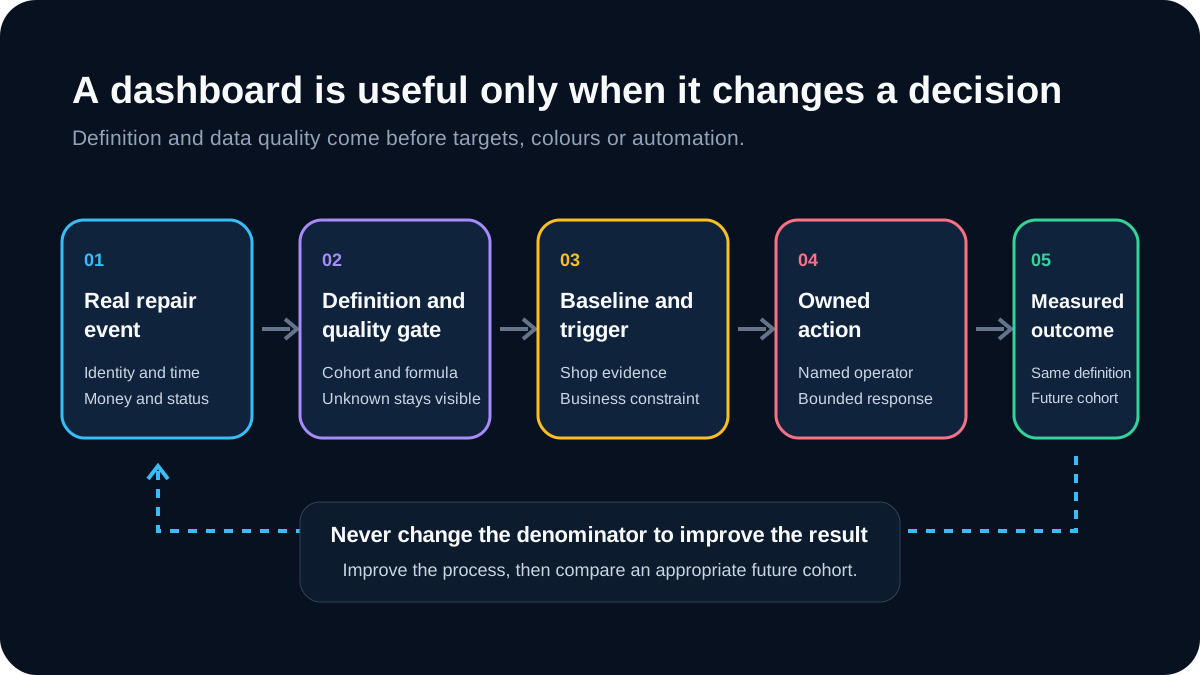
Set a baseline, trigger and action
Use a clean observation period long enough to contain the shop's normal mix. Record the median and range rather than one average where a few long cases can distort the result. Then set a trigger from the business constraint:
- a cash minimum may trigger collection work;
- a customer promise may trigger a flow investigation;
- a safety or quality failure may trigger an immediate stop regardless of frequency;
- a supplier pattern may trigger quarantine or RMA review; and
- a repeated quote loss may trigger a pricing, trust or scope test.
Every trigger needs an owner and a bounded action. “Improve turnaround” is not an action. “Operations lead reviews every case above the current 90th percentile on Monday and assigns one delay cause” is.
After the action, keep the original definition and measure an appropriate future cohort. Changing the denominator until the number improves destroys comparability.
Diagnose the metric before changing the shop
A falling average collected repair value
Split by repair category, device, part tier, channel, location, discount reason and refund. The cause may be mix rather than pricing. Use the pricebook control method before changing every price.
A longer intake-to-ready time
Separate working time from waiting for approval, parts, specialist work or customer response. Review the event chain in the repair operations playbook and the stock exception in the inventory-control guide.
A rising reopened-repair rate
Group by original fault, device, part, supplier batch, technician, test exception and reported cause. Do not assume blame from correlation. Link the case to the warranty control route and any supplier case to the RMA reconciliation guide.
A falling quote-to-book rate
Check response time, unsupported-device mix, quote completeness, price presentation, appointment availability and duplicate enquiry handling. The AI quote guide provides a controlled test for automated identity and price matching; it does not promise a conversion uplift.
Avoid the common KPI traps
- Universal targets. Another shop's threshold can be wrong for your repair mix and cost base.
- Moving definitions. A prettier number after changing exclusions is not improvement.
- Average only. Pair cycle-time median with the 90th percentile so the long tail remains visible.
- Activity as outcome. Messages sent, quotes issued and parts ordered are events, not completed customer outcomes.
- Rework as revenue. Link a repeat visit to the original repair and cost it there.
- Ranking staff without case mix. Technician comparisons need repair complexity, testability, parts and inherited work context.
- Dashboard without action. A metric with no owner or response is reporting overhead.
- Real-time theatre. Weekly or monthly review is often better when the action cannot responsibly happen every minute.
How Cellbot fits
Cellbot's public features include connected repair, customer, inventory, payment and communication workflows. That can provide source events for several definitions, but availability of an event is not proof that a finished KPI is correct. Confirm the current report or export, validate its filters against this register and keep accounting sign-off for financial measures.
Do not claim that one dashboard “tracks all 12 automatically” unless each formula, cohort, exclusion and correction rule has been tested against raw records.
Frequently asked questions
What is the most important repair shop KPI?
Start with completed and paid repairs plus contribution per completed repair. Volume without contribution can scale a loss, while contribution without completed paid work can be a spreadsheet assumption.
What is a good first-time fix rate?
There is no universal phone-repair target in this guide. Define the eligible repairs, required final test, not-testable state, rework rule and observation window; establish the shop's clean baseline; then improve it without encouraging skipped tests or hidden reopenings.
How often should repair shop KPIs be reviewed?
Review data-quality failures and safety exceptions when they occur, operating flow and quality weekly, and formal financial performance after monthly reconciliation. Change the cadence only when a named action can use the faster signal.
Should KPIs be compared between technicians?
Only with care. Compare like repair types and account for diagnosis, part quality, inherited work, testability, training and complexity. Use the data to investigate a process and coach safely, not to reward rushed work.
Do I need specialist software?
No. A controlled spreadsheet can support a single bench. Software becomes useful when event volume, permissions, multiple locations or linked customer-device-job history make manual reconciliation unreliable.
Bottom line
The best repair shop KPI is not the most impressive number. It is the one staff can reproduce from the same events, interpret within the same cohort and act on without creating a worse outcome. Fix the definition and data quality first; baseline the shop second; set the trigger and owner third; automate only after the manual result is trusted.
Continue with the repair-shop earnings model, operations playbook or inventory-control guide.
What changed on 29 August 2026
The former page's UK/US revenue, repair-volume, margin, conversion, review, rework, utilisation, lifetime-value and channel-cost targets were removed because no reproducible phone-repair evidence supported them. This replacement adds exact definitions, denominator and cohort rules, data-quality gates, an action register and explicit safeguards against reclassifying poor outcomes.
Sources and method
This is an original operating-method article rather than an industry benchmark report. No external performance target is used. The 12 definitions were selected to connect commercial result, flow, quality, parts and cash while avoiding duplicate ownership of pricing, accounting, inventory, warranty and RMA methods.
Two official record-keeping references support the narrow requirement that financial measures reconcile to identifiable transactions; neither supplies a repair-shop performance target:


