
By Hassan, Technical Lead at Cellbot
Published: 3 April 2025 · Fully reviewed: 29 August 2026
There is no universally best repair shop software. The useful shortlist depends on the work your shop does:
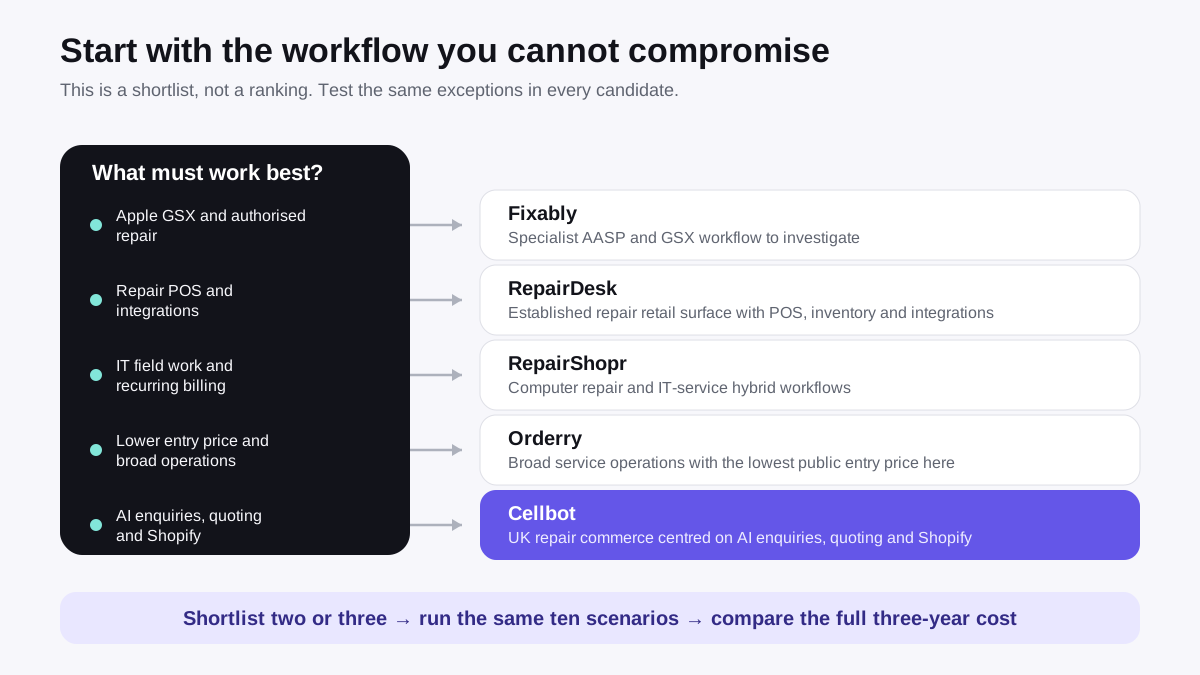
- Cellbot is the most relevant option here for an independent that prioritises customer-facing AI, repair quoting and website conversion in one workflow.
- RepairDesk has the clearest public fit for an established repair retailer that wants repair tickets, POS, inventory and a broad integration list.
- RepairShopr is worth shortlisting for a computer-repair or IT-service business that needs field jobs, recurring invoicing and repair tickets in one system.
- Orderry offers a broad operations suite and the lowest published entry price in this five-product comparison.
- Fixably is the specialist choice to investigate when Apple GSX and authorised-service workflows are non-negotiable.
That is the short answer. Do not buy from that summary alone. Run the same jobs, exceptions and data-export test in every shortlisted product before deciding.
Conflict disclosure: Cellbot publishes this comparison and Hassan helps build Cellbot. That makes us a primary source for Cellbot, not an independent judge of it. We have therefore removed the old unsourced scores and claims of hands-on competitor testing. Vendor facts below come from current first-party pages; the recommendations are clearly labelled as our judgement.
Evidence note and limitations
We checked the vendors' public pricing and product pages on 26 August 2026. Prices stay in the currency each vendor publishes, exclude tax unless the vendor says otherwise and may change after this review date. “From” prices do not include every user, location, message, payment, hardware, onboarding or add-on cost.
This is a desk-researched buyer's guide, not a laboratory test. Public pages can establish plan structure and advertised capabilities. They cannot prove uptime, support quality, ease of use, migration accuracy or how a feature behaves under pressure. The test sheet later in this guide is designed to expose those gaps with your own workflow.
The comparison at a glance
| Product | Best-documented fit | Current public entry price | Important pricing condition | Verify before buying |
| Cellbot | Independents prioritising AI enquiries, quoting and website conversion | $69/month | Paid-only; location and team limits vary by tier | Whether its younger ecosystem covers every integration and in-store POS requirement you have |
| RepairDesk | Repair retailers wanting tickets, POS, inventory and multi-store tooling | $99/store/month, or $79/store/month billed annually | Per-store pricing; five users on Essential | Add-on costs, payment availability and the exact migration scope for your country |
| RepairShopr | Computer repair and IT-service hybrids | $69.99/month | Starter caps tickets, invoices, users and locations | Whether its workflow and product pace suit a phone-repair-led shop |
| Orderry | Service businesses wanting broad operations at a lower entry point | $39/month Hobby | Hobby caps employees and work orders; higher plans add employee and location fees | Which repair-specific workflows are native rather than configured from general service tools |
| Fixably | Apple Authorised Service Providers and enterprise after-sales teams | Quote required | No current public price on the page reviewed | Contract, implementation, support and whether its enterprise scope is proportionate to your shop |
The table deliberately has no overall score. A single number would pretend that an AASP, a one-person phone shop and a multi-location computer repair business value the same things.
Which repair shop software should you shortlist?
Choose Cellbot when enquiries and repair commerce are the bottleneck
Cellbot's current public tiers are Starter at $69, Pro at $99 and Pro Plus at $179 per month, billed in USD. Starter includes 1,000+ built-in iPhone and iPad repair prices. Pro includes 3,000+ iPhone, iPad and Samsung prices. Pro Plus includes up to 10,000 prices across those families, other Android phones and MacBook, plus the installable mobile app with the full communications pack. The pricing page states that the product is paid-only and offers a 14-day guarantee on a first subscription. It also makes tier limits visible: Starter is for one location and one team member, Pro supports up to three locations and five team members, and Pro Plus removes those caps.
The strongest documented case for Cellbot is the connection between the customer-facing journey and the repair record. Its feature catalogue includes an AI chat widget, pricebook-based quoting, bookings, ticket management, customer history, communications, inventory and workflow automation. WordPress shops can install the official Cellbot plugin from WordPress.org; it loads the same widget after the shop adds its Cellbot shop ID. Cellbot's Shopify app is not yet listed in the Shopify App Store, so Shopify buyers should test only the currently supported embed and any separately scoped connection.
Do not choose Cellbot merely because this article is on Cellbot's site. Choose another product if you need Apple GSX, a long-established third-party ecosystem, dedicated POS hardware or a workflow that Cellbot cannot demonstrate with your real exceptions. Cellbot is the younger product in this shortlist, and that carries integration and maturity risk even when its architecture is a better fit.
Choose RepairDesk when mature retail operations matter most
RepairDesk's current pricing lists Essential at $99 per store per month, or $79 per store per month when billed annually. Growth is $149 monthly or $119 annually per store; Advanced requires a quote. Essential lists five users, while Growth lists eight.
RepairDesk publicly documents repair tickets, POS, inventory, reporting, customer-facing tools and integrations including Shopify, WooCommerce, QuickBooks, Xero, Stripe and PayPal. That makes it a credible first demo for an established repair retailer that wants broad operational coverage from one known platform.
The trade-off is cost structure and complexity. Per-store pricing compounds as locations grow, and some loyalty, campaign, appointment and connection features are marked as paid add-ons. Ask for a written total covering every store, user, message, payment service and add-on you need. If RepairDesk already runs your shop reliably, read the RepairDesk alternatives guide before accepting the disruption of a migration.
Choose RepairShopr for an IT-service and repair mix
RepairShopr's pricing page lists Starter at $69.99 per month with one user, one location and 75 tickets and invoices. Its Repair Shop plan is $139.99 per month with ten users and unlimited tickets; the Big Chain plan is $149.99 per month for two or more locations, subject to the page's stated plan limits.
The public feature list includes field jobs, estimates, recurring invoicing, a customer portal, time tracking, leads, website integration and QuickBooks integration. Those capabilities make RepairShopr particularly relevant to a business that mixes device repair with managed IT, call-outs or recurring service work.
Phone-repair specialists should test the parts, device, warranty and high-volume counter workflows rather than assuming the broad service feature set is automatically the best fit. Also verify current development cadence, integrations and support response using evidence from the sales process, not forum hearsay.
Choose Orderry when broad operations and a lower entry price matter
Orderry's current pricing lists Hobby at $39 per month for two employees and 100 work orders or sales per 30 days. Startup begins at $69, Business at $99 and Enterprise at $199 per month. Employee and additional-location charges vary by plan, and the vendor advertises a seven-day trial without a credit card.
The same page documents job management, inventory, warehouses, purchase orders, customer records, Instagram and Facebook messages, WhatsApp, payments, analytics and several AI-assisted tasks. It is the broadest publicly described operations set at the lowest headline entry price in this group.
The buying question is not whether Orderry has many features. It is how much configuration your repair workflow needs and what the real price becomes for your staff and locations. Test device identification, parts allocation, warranty rework, messaging and export in the exact tier you intend to buy. Do not evaluate the top-tier feature list while budgeting for Hobby.
Choose Fixably when authorised Apple service defines the workflow
Fixably's AASP product page documents Apple GSX integration for creating, tracking and updating authorised repairs, as well as warranty lookups, customer communications, audit data and labour-reimbursement handling. That is a distinct requirement, not a generic feature-box comparison.
Fixably does not publish a current price on the page reviewed, so any precise price copied from an old comparison would be unreliable. Request a written proposal covering implementation, locations, users, support, integrations and contract length.
For an independent shop without authorised-service obligations, Fixably's enterprise scope may be unnecessary. For an AASP, the GSX workflow may outweigh the lower headline prices elsewhere. Our Cellbot versus Fixably comparison explains that poor-fit boundary in more detail.
Where each product can beat Cellbot
A fair comparison must make it possible to choose against the publisher:
| If this is your constraint | Stronger first shortlist than Cellbot | Why |
| Apple-authorised repairs and GSX | Fixably | GSX is a documented core workflow; Cellbot does not advertise it |
| Established repair POS and broad listed integrations | RepairDesk | Its public product surface is mature and retail-oriented |
| IT field work and recurring service billing | RepairShopr | Those service workflows are explicit in its current plans |
| Lowest headline entry price in this group | Orderry Hobby | $39/month, subject to its employee and work-order caps |
| AI enquiry handling, pricebook quoting and Shopify in one UK-focused product | Cellbot | These are central, documented Cellbot workflows rather than peripheral add-ons |
This table is a shortlist, not proof of superiority. Your tested workflow and full cost still decide the result.
Use this 100-point repair-software test sheet
Start with the repair shop management software guide if you need to define the category. When you are ready to buy, score evidence rather than sales claims.
For each product, give every criterion a score from 0 to 5 after testing it. Multiply the score by the weight and divide by five. A claimed feature that you did not see working scores no more than 1. A required feature that fails blocks the purchase even if the total is high.
| Criterion | Weight | Evidence to collect |
| Ticket and repair workflow | 15 | Complete intake, diagnosis, approval, parts, repair, QC, collection and rework |
| Inventory and purchasing | 10 | Reserve a part, receive an order, record a damaged item and reconcile stock |
| Customer communications | 10 | Trigger and audit messages across the channels you actually use |
| Automation and AI | 8 | Test accuracy, approvals, failure handling and the ability to switch automation off |
| Data ownership and export | 10 | Export customers, tickets, stock, invoices, notes and attachments in usable formats |
| Roles, security and audit history | 10 | Prove a junior user cannot see or change restricted records; inspect the activity trail |
| Reporting | 8 | Reproduce revenue, margin, turnaround and technician figures from sample records |
| Payments and invoicing | 7 | Take a deposit, split a payment, refund and complete a warranty job |
| Integrations and e-commerce | 7 | Run the real Shopify, accounting, payment or messaging connection end to end |
| Migration | 5 | Import a representative sample and reconcile row counts and critical fields |
| Support and operational resilience | 5 | Record response times, backup/export options and the process for a serious incident |
| Three-year total cost | 5 | Include tiers, seats, stores, messages, payments, hardware, onboarding and exit work |
| Total | 100 | Keep screenshots, exports and written answers with the score |
The fuller software selection checklist includes questions for demos and contracts. Once access begins, use the 14-day repair software trial plan to run comparable scenarios and test the export before expiry.
Ten scenarios every shortlist must survive
Use invented or properly redacted records. Do not upload live customer personal data into trial accounts without an approved data-processing basis.
- Quote and book a common repair from a website enquiry.
- Check in an unknown or incorrectly described device without forcing a false model match.
- Reserve the final part in stock and stop a second technician allocating it.
- Take a deposit, record a split payment and issue a refund.
- Reopen a completed job as a warranty rework without counting it as new revenue.
- Hand a repair between technicians while preserving notes, photos and responsibility.
- Delay a job for parts and send the correct customer update once, not twice.
- Receive a supplier order with one missing and one damaged item.
- Export one customer's full record, then export the shop's operational data in bulk.
- Remove a user's permission and confirm both access control and the audit trail.
Run the awkward cases. A perfect happy-path demo tells you little about the Saturday afternoon when stock is wrong, a customer wants a refund and the senior technician is absent.
Calculate total cost before comparing prices
Headline subscription prices are not comparable until the same shop is modelled in every product. Use one scenario, such as two locations, six users and 700 tickets per month, then request a written cost for:
- the required plan and billing term;
- every location and user;
- SMS, WhatsApp, email and AI usage;
- payments and settlement fees;
- POS hardware, printers, scanners and terminals;
- accounting, e-commerce and other integrations;
- onboarding, data migration and training;
- premium support or implementation;
- contract uplift and cancellation terms; and
- data extraction and exit work.
Convert currencies only after recording the exchange-rate date. Keep tax separate. A cheaper first month can become the expensive choice if it requires manual work, paid add-ons or a difficult exit, but do not invent an ROI figure to make that argument. Measure the labour and error rate in your own shop.
Final recommendation
For most buyers, the right next step is a two- or three-product shortlist, not a universal winner:
- include RepairDesk if mature repair retail operations are central;
- include RepairShopr for a genuine IT-service hybrid;
- include Orderry when entry price and broad operations matter;
- include Fixably when Apple GSX is a requirement; and
- include Cellbot when AI enquiries, repair quoting and website conversion are priority workflows.
Then run the same ten scenarios, score the evidence and compare the full three-year cost. If Cellbot cannot win that test for your shop, choose the product that does.
Frequently asked questions
What is the best software for a phone repair shop?
There is no single best product. RepairDesk is a strong first demo for established repair retail; Orderry for broad operations at a lower entry price; RepairShopr for IT-service hybrids; Fixably for Apple-authorised workflows; and Cellbot for AI-led enquiries, quoting and website conversion. Test the full repair lifecycle before buying.
Is there free repair shop software?
Some vendors offer low-cost plans, trials or capped products, but the current Cellbot offer is paid-only. Compare limits, data export, support and the cost of the missing workflow rather than treating £0 as the whole cost. The free repair shop software guide covers that intent separately.
How long should a software evaluation take?
Long enough to run a complete operating cycle and the exceptions that usually cause trouble. The ten scenarios above matter more than an arbitrary number of days. Do not sign until you have tested export, permissions, warranty rework and the real integrations.
Is this comparison independent?
No. It is published by Cellbot and written by a Cellbot technical lead. The conflict is explicit, vendor facts are linked to first-party sources and the guide gives concrete reasons to buy competitors. Use it as a transparent shortlist and test method, not as an independent award.
Sources and update record
Product and pricing facts were checked on 29 August 2026 against:
- RepairDesk pricing and RepairDesk features
- RepairShopr pricing
- Orderry pricing and plan features
- Fixably AASP and GSX solution
- Cellbot pricing and Cellbot features
- Cellbot Widget on WordPress.org
29 August 2026 update: widened the title from UK-only intent to phone and electronics repair, verified Cellbot's live WordPress plugin and clarified that its Shopify App Store listing is still pending. The comparison retains its poor-fit cases, 100-point worksheet and reproducible ten-scenario test.


