
By Hassan, Technical Lead at Cellbot
Published: 4 April 2026 · Fully reviewed: 29 August 2026
Choose repair shop software by testing two or three products against the same jobs, exceptions and exit requirements. A feature list can create a shortlist, but it cannot show whether stock stays accurate, permissions hold, messages fire once or your data comes back in a usable form.
The process below takes 30 days because it includes preparation, comparable demos, a controlled pilot and a written decision. Compress the calendar if your shop is simple, but do not skip the must-pass tests.
Download the repair shop software evaluation worksheet before you begin. It uses the same 100-point weighting for every product and leaves space for evidence rather than sales notes.
Scope and conflict disclosure
Cellbot publishes this buyer guide, and Hassan helps build Cellbot. The method must therefore work even when Cellbot loses. A must-pass failure blocks any product, including ours, regardless of its total score.
This is a UK operational framework reviewed on 26 August 2026. Security, data-protection, payment and contract questions point to official guidance but are not legal or compliance advice. Use invented or appropriately redacted pilot data unless your organisation has approved the supplier and processing arrangement.
Days 1–3: define outcomes, not a feature wish list
Start with the failures you need the new system to prevent. Write each requirement as an observable outcome.
“Good inventory” | A reserved part cannot be promised to a second ticket, and a damaged delivery can be quarantined without appearing as available stock
“Automated messages” | A delayed-parts status sends one approved message on the chosen channel and records delivery or failure
“Flexible tickets” | Staff can correct a device model, revise the approved scope and reopen a warranty return without erasing history
“Secure” | A junior user cannot export all customers, and removing a user blocks access while preserving the audit trail
“Easy reporting” | Revenue, refunds, outstanding balances and warranty rework can be reproduced from the sample jobs
“Integrates with Shopify” | A booking, deposit, cancellation and refund reconcile across both systems without duplicate customers or stock
Mark a requirement must pass only when the shop cannot operate safely or lawfully without it. Everything else receives a weight. If half the worksheet is marked critical, the priorities have not been decided.
The repair shop management software requirements guide defines the linked customer, device, job, part, payment, message and warranty records behind these tests.
Days 4–6: model the shop you are actually buying for
Vendors cannot quote or demonstrate accurately without a common scenario. Record:
- locations now and in the next three years;
- named users by role, including temporary or read-only access;
- repairs, sales and messages in a normal and peak month;
- repair types, booking channels and payment methods;
- stock locations, serial or batch tracking and purchase-order volume;
- required accounting, e-commerce, payment and communications systems;
- open jobs, customer history and attachments to migrate; and
- the service, support and recovery expectations the shop depends on.
Use one model for every vendor. Do not let one quote assume one location and another assume the planned second shop.
Days 7–10: shortlist two or three products
Use public evidence to remove obvious poor fits before booking calls. The current five-product comparison is one starting point, but add a product if it serves a specialist requirement the comparison does not cover.
Reject a candidate early when:
- a non-negotiable workflow is absent or only promised on a roadmap;
- the required country, currency, payment or messaging channel is unsupported;
- its user or location model makes the three-year cost unacceptable;
- it will not explain data export, deletion or processor terms;
- the supplier cannot state which tier contains the demonstrated feature; or
- your shop requires an authorised-service integration that the product does not provide.
Keep the shortlist small enough to test properly. Five superficial demos produce less evidence than two serious pilots.
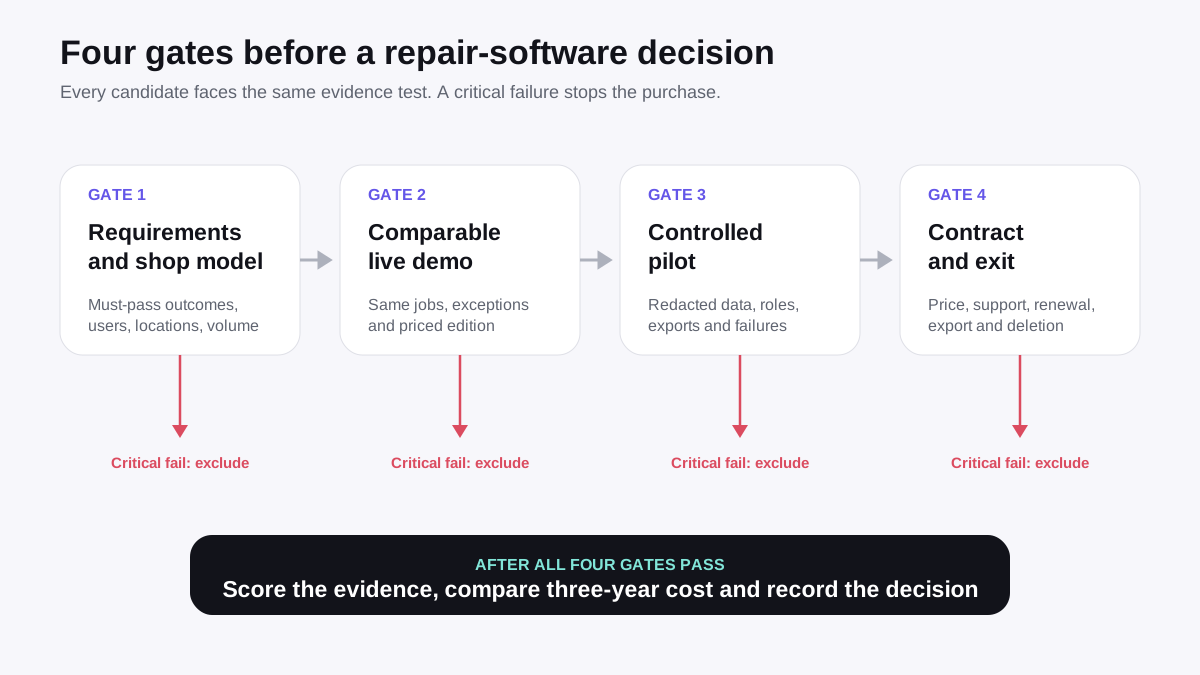
Days 11–14: make every vendor run the same demo
Send the script in advance and ask the demonstrator to use the tier you are pricing. Screen-share a live product, not a slide deck.
Core job script
- Create a customer enquiry with an uncertain device model.
- Confirm the device at intake and record its condition and accessories.
- Diagnose the fault, issue a revised quote and capture approval.
- Reserve the last matching part and create a purchase order for another.
- Hand the repair between two technicians without replacing the history.
- Complete quality control, take a deposit and split the remaining payment.
- Reopen the job as a warranty return and record the outcome without new revenue.
Exception script
- Enter the wrong model, then correct it.
- Receive a damaged part and quarantine it.
- Make an integration unavailable and show the retry or reconciliation queue.
- Remove a staff permission while their session is active.
- Export the complete customer and repair record.
- Restore or demonstrate the documented recovery path for a lost record.
Record the screen, with permission, or take dated notes and screenshots. A verbal “yes, it can” scores no more than 1 out of 5 until the workflow is shown or documented.
Days 15–21: run a controlled pilot
Use a representative sample, including awkward records. Do not upload the entire customer database to discover whether the import works.
If the access window is shorter than this 30-day buying process, prepare first and use the 14-day repair software trial checklist for the hands-on stage. It keeps the offer, scenario and exit evidence separate from the wider contract decision.
The ICO's data-protection-by-design guidance says privacy and data protection should be considered from the design stage through the lifecycle, with personal information limited to what is necessary. For an early pilot, synthetic records may answer the workflow question without exposing customer data.
Test at least:
- a common repair, an uncommon device and a misidentified device;
- a deposit, split payment, refund and warranty rework;
- an in-stock part, an ordered part and a damaged part;
- a customer who changes channel or stops responding;
- a technician handover and a restricted user;
- an export, deletion request workflow and failed integration; and
- the busiest realistic queue your team can simulate safely.
Measure task completion, corrections and exceptions rather than vague ease-of-use. Note how many screens or minutes a task takes only when the same person and scenario are used in every product.
Days 18–22: test security, data and recovery
The supplier's questionnaire is supporting evidence; your own permission and export tests still matter.
Ask for:
- processor and subprocessor terms, data locations and deletion process;
- individual accounts, authentication options and privileged-access controls;
- role definitions and an audit history for sensitive actions;
- encryption and incident-notification commitments;
- backup frequency, retention, restore testing and recovery objectives;
- data export formats, attachment handling and API limits; and
- what happens to data after cancellation.
The ICO security outcomes say access rights should be limited to users who need them, removed when no longer needed and supported by an appropriate audit trail. The NCSC small-organisation guide covers account protection, devices and tested backups.
For payments, identify which system handles card data. The PCI Security Standards Council's small-merchant guide advises merchants to store only what they need and notes that outsourcing processing can reduce risk. A repair note is not a place for card details.
Days 23–25: compare the three-year cost
Request a written price for the same shop model and separate:
- subscription tier and billing term;
- locations, users and usage caps;
- messages, AI or automation usage;
- payment and settlement fees;
- hardware and consumables;
- required add-ons and integrations;
- migration, configuration and training;
- support or implementation packages;
- likely contract increases; and
- extraction and exit work.
Keep native currencies until the final comparison, then record the exchange-rate date and tax treatment. A “from” price without the required users, locations and add-ons is not the price of your scenario.
Do not award speculative time savings. If the pilot reduces a task from six minutes to three, state the sample, person and task, then decide whether that evidence is representative.
Days 26–27: check the contract and exit before the purchase
Read the order form, service terms, data terms and support terms together. Confirm in writing:
- the exact plan, price, renewal and notice period;
- which demonstrated capabilities are contracted today;
- implementation and migration responsibilities;
- support hours, severity levels and escalation;
- service-credit or termination rights, where offered;
- data ownership, export assistance and deletion timing; and
- any limits on API, attachments, messages, records or historical access.
Do not treat a roadmap promise as delivered scope. If a feature is essential, it should work in the pilot or appear as an enforceable commitment you are willing to rely on after legal review.
Days 28–30: score the evidence and write the decision
The worksheet totals 100 points across workflow, inventory, communications, automation, data, security, reporting, payments, integrations, migration, resilience and cost.
Apply four rules:
- A must-pass failure blocks the product.
- An untested claim scores no more than 1 out of 5.
- The person who ran the test writes the evidence note.
- Record why the losing products lost, not only why the winner won.
The decision record should contain the shop model, candidates, evidence links, scores, must-pass results, three-year cost, known limitations, contract conditions, migration owner and a review date. That gives the business a defensible answer when a renewal or replacement is considered later.
Common buying mistakes
Comparing different editions
A top-tier demo and entry-tier quote are not one offer. Put the edition name beside every scored feature.
Treating integrations as logos
Run a create, update, refund, deletion and failure case. Confirm which system owns each record and how reconciliation works.
Ignoring data exit
An export button may omit attachments, audit history, stock movements or message threads. Inspect the actual files before buying.
Migrating everything
Old duplicates, obsolete stock and inconsistent statuses do not become better data after import. Clean, sample, reconcile and keep an agreed source archive.
Letting the vendor define success
The shop owns the requirements and score. The vendor supplies evidence and answers.
Frequently asked questions
How many repair software products should I test?
Usually two or three. Include enough products to cover genuinely different fits, then test them deeply. More demos are useful only when the existing shortlist cannot meet a requirement.
Can I use live customer data in a trial?
Not by default. Start with synthetic or appropriately redacted records. Before using personal data, establish the processing purpose, supplier terms, access controls and other safeguards relevant to your organisation.
What score is good enough?
The total supports comparison; it does not override a must-pass failure. Set the acceptance threshold before the demos and require a written risk decision for any weak critical area.
Should Cellbot be on every shortlist?
No. Include it when AI enquiries, repair quoting and website conversion are central. WordPress shops can verify the official Cellbot plugin before a trial. Shopify shops should account for the fact that Cellbot is not yet listed in the Shopify App Store and test only the supported route available to them. Exclude Cellbot when it cannot demonstrate a non-negotiable workflow, when Apple GSX is required, when a mature integration ecosystem matters more, or when its paid tiers do not fit the budget and team structure.
Sources and update record
Official guidance and product evidence checked on 29 August 2026:
- ICO data protection by design and default
- ICO security outcomes
- NCSC small-organisation cyber-security guide
- PCI SSC small-merchant payment guide
- Cellbot Widget on WordPress.org
29 August 2026 update: verified Cellbot's live WordPress plugin, clarified that its Shopify App Store listing is pending and retained the downloadable worksheet, comparable demo script, controlled pilot, contract and exit gates.


