
By Hassan, Technical Lead at Cellbot
Published: 7 November 2024 · Fully reviewed: 29 August 2026
The right way to display repair prices on Shopify depends on how certain the price is before inspection. Use an exact price for repeatable work, from pricing for a known minimum, a diagnostic fee when finding the fault is paid work, a deposit when you need commitment before allocating time or parts, and an assessed quote when the scope cannot be known remotely.
Do not force every repair into one format. The useful promise is not “every job has a fixed price”; it is “the customer can see how this job will be priced, what happens next and what could change the amount”.
Conflict disclosure: Cellbot sells repair-management software and a Shopify-compatible embed. Shopify facts in this guide link to current official documentation checked on 26 August 2026. The pricing decision model, data contract and stale-price controls are Cellbot editorial frameworks.
In brief
- Match the price format to quote certainty, not to a blanket transparency rule.
- Keep the amount, currency, tax treatment, scope, expiry and source record together.
- A short service catalogue can use Shopify products; a large repair matrix needs a structured price source and search interface.
- The price shown, selected, invoiced and stored on the repair record must be traceable to the same version.
- Publish useful, crawlable device or service pages selectively. Do not turn every price combination into a thin indexable page.
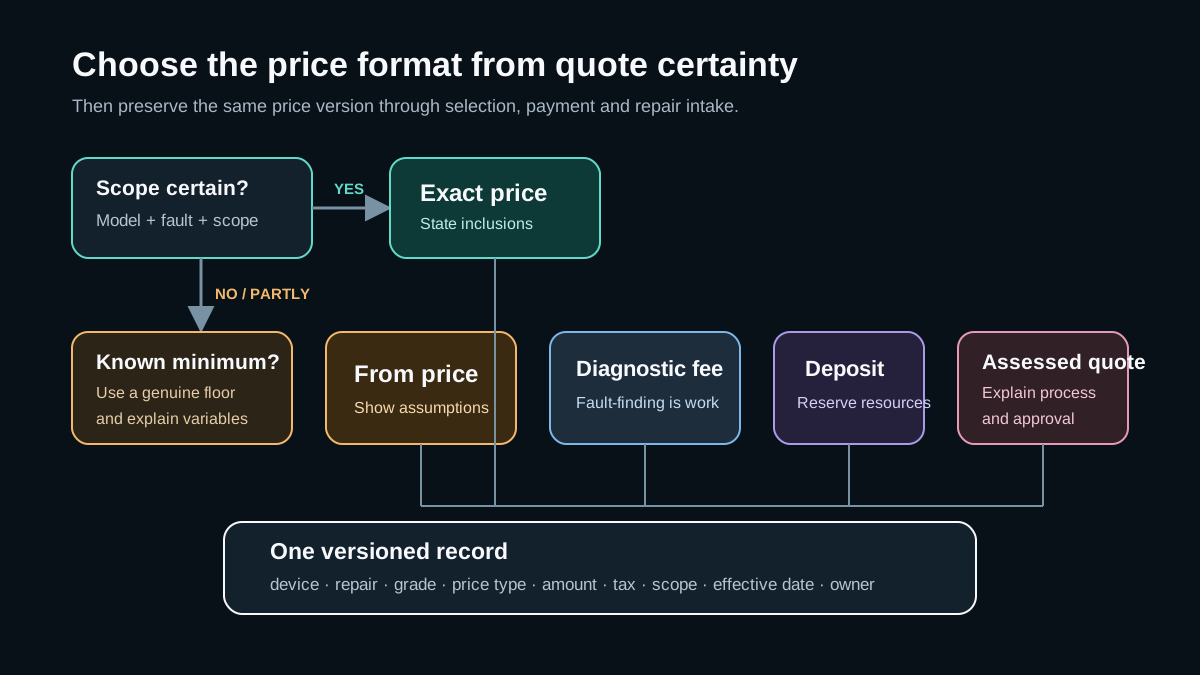
Which repair price format should you show?
Start with the uncertainty in the job, not with the software.
| Price format | Use it when | Show beside the amount | Avoid |
| Exact price | Model, fault, part grade and scope are known | What is included, tax treatment, turnaround assumption and warranty terms | Adding “from” when the price is genuinely fixed |
| From price | There is a defensible minimum but condition or part choice can change the total | The assumptions behind the minimum and when approval is requested | A low headline price that almost no customer receives |
| Diagnostic fee | Fault-finding is a real, chargeable service | Fee, whether it is credited to an approved repair and what the customer receives | Calling it free if a later charge is unavoidable |
| Deposit | Capacity, collection or parts must be reserved | Refund/cancellation rules and how the balance is calculated | Presenting the deposit as the full repair price |
| Assessed quote | Damage, data-recovery effort or board-level scope cannot be known remotely | Assessment process, likely response time and approval step | “Contact us” with no explanation of the process |
Exact prices
An exact price suits a repeatable job such as a specific battery replacement with one agreed part grade. The page should still define the scope. If frame damage, liquid ingress or another fault changes the work, state that the shop will seek approval before proceeding.
An exact price is only exact for the identified combination. “iPhone screen repair £79” is ambiguous if model, display grade or tax treatment can change it. The customer-facing label and the underlying record should carry the same specificity.
From prices
“From £79” is useful only when £79 is a realistic starting point and the page explains the variables. Examples include part grade, device condition or access time. A bare “from” price answers less than it appears to answer.
Give the customer a decision boundary: “from £79 for the standard part on an otherwise undamaged frame; we confirm any change before repair”. This makes the minimum interpretable without pretending diagnosis has already happened.
Diagnostic fees and assessed quotes
Some repairs are investigations before they are repairs. Board faults, intermittent failures, liquid damage and data recovery can require skilled time before a scope exists. Show the diagnostic fee, what evidence or report it produces, whether it is credited to later work and the approval process.
If assessment is free, say what is free and when charges can begin. If it is paid, describe it as a service rather than hiding it behind a quote request.
Deposits
A deposit is a payment rule, not a repair price. The page and checkout should identify it as a deposit, show the expected balance logic and link to cancellation terms. The eventual repair record must retain both the deposit and the approved total so staff do not treat the first payment as settlement.
How should Shopify hold repair prices?
There are three practical publishing patterns.
1. Shopify products for a small, stable service menu
Shopify documents how merchants can sell services as non-physical products and points service sellers to booking apps where appointments are required. A product can work well when the catalogue is deliberately small and each service has clear scope.
Use the product title, options and description to preserve the device, repair, part grade and inclusion rules. If extra intake fields are collected in the theme, Shopify supports line-item properties for supplementary product-form information. Test that those details survive cart, checkout, notifications, exports and any downstream integration.
Do not build a sprawling repair database out of products merely because the mechanism exists. The maintenance cost, navigation and duplicate-page risk can outweigh the convenience of native product pages.
2. A curated price page for the repairs customers ask for most
A normal Shopify page can show a concise, accessible table for a limited set of popular repairs. This is often the simplest sound solution for a small shop.
Each row should include:
- device or supported model range;
- repair and part grade;
- exact, from or diagnostic price type;
- currency and tax treatment;
- inclusion or exclusion note;
- last reviewed date; and
- a booking, call or assessment action appropriate to that row.
Keep a named owner and review cadence. A page nobody owns becomes an archive of old promises.
3. A searchable repair pricebook for a large matrix
Once brands, models, faults and part options create hundreds or thousands of combinations, use a structured price source with a search or selector interface. The Shopify page can remain the customer-facing surface while the pricebook owns the repair records.
The selector should have a visible fallback. Customers must be able to request an assessment when a model is missing, the device is uncertain or the fault does not match the menu. “No result” is a valid operational state, not permission to invent a nearest price.
The minimum repair-price data contract
Treat each displayed price as a versioned promise. At minimum, preserve:
Device identifier | Prevents similarly named models being confused
Repair identifier | Distinguishes the service from the symptom
Part or service grade | Explains material price differences
Price type | Exact, from, diagnostic, deposit or assessed quote
Amount and currency | Keeps the financial value explicit
Tax treatment | Prevents avoidable checkout surprises
Included scope | Defines what the amount covers
Exceptions | States what may require approval
Effective date and version | Makes an old quote traceable
Expiry or review date | Creates a stale-price control
Source and owner | Identifies who can correct it
When a customer selects a price, store the version with the booking or enquiry. If the central price changes five minutes later, staff should still know exactly what that customer saw.
Connect the displayed price to checkout and the repair record
Shopify draft orders can include products or custom items, accept discounts and send the customer an invoice with a checkout link. That makes them one possible approval-and-payment route for a repair whose final scope has been agreed.
The important control is not whether you use a product, custom item or draft order. It is whether the same repair reference connects:
- the price the customer saw;
- the option they selected;
- the deposit or payment;
- the approved repair scope; and
- the repair ticket and later warranty record.
Use idempotent integration behaviour where systems meet. A customer refreshing a confirmation page or a webhook retrying must not create a second booking, payment request or repair ticket.
For the preceding workflow, use the Shopify repair booking guide. For the system boundary, use the Shopify repair-services architecture guide.
How should repair pricing pages support search and answer engines?
A useful repair-pricing page answers a real customer question in visible text. It does not need thousands of generated URLs.
Publish pages only where the intent is distinct
A dedicated page can be useful for a major device family, repair service or location when it contains an actually maintained price, scope, service conditions and next action. Near-identical pages with only a model or town swapped create little customer value and divide maintenance effort.
Use clear headings that follow the decision: device, repair, price type, what is included, exceptions, turnaround assumption and booking route. Keep important explanations in the rendered page rather than only inside a script-driven selector.
Keep links and facts machine-readable without writing for machines
Use normal crawlable links to the booking, warranty, location and relevant repair pages. Write the answer immediately below the question heading, then add the conditions a person needs to act safely. This format also gives search and AI systems a self-contained passage to interpret.
Structured data must describe the visible page accurately. Google’s policies require marked-up content to be visible and representative; adding unsupported prices, ratings or service claims is not a shortcut to a richer result. Use the schema types appropriate to the actual page and business, validate the output, and do not promise a particular search treatment.
Preserve provenance and freshness
Display a review date and keep the underlying source, version and owner internally. When a price changes, update the visible page and any connected feeds or widgets together. A stale, highly optimised answer is still a bad answer.
A stale-price control that a small team can run
Use one source of truth and a short exception report:
- compare every published price version with the current source record;
- flag expired prices and records without an owner;
- flag displayed prices whose tax or part-grade labels are missing;
- check that selected prices reach the booking and repair record unchanged;
- unpublish or replace a price when it cannot be verified; and
- sample the top customer journeys after every theme, app or integration change.
A monthly review may suit a stable catalogue; a faster cadence may be required when parts costs move frequently. The correct interval is the longest one that still prevents staff from routinely overriding the website at the counter.
Where Cellbot fits
Cellbot’s current public product pages describe a Shopify-compatible embed. Cellbot is not yet listed in the Shopify App Store. Its Pro Plus tier includes up to 10,000 built-in prices across iPhone, iPad, Samsung, other Android phones and MacBook. Starter and Pro use narrower family-based coverage, and shops can add custom prices. The public FAQ says Shopify merchants who want draft orders connected should discuss that setup with the team.
That makes Cellbot one candidate for the searchable-pricebook pattern. It does not remove the merchant’s responsibility to set prices, tax treatment, part grades, terms and exception handling. Demonstrate the intended Shopify theme, missing-device path, price override, deposit, cancellation and duplicate-event behaviour before relying on it in production.
Compare the implementation against the repair software buyer test and check the current Cellbot pricing and plan limits.
Launch test for Shopify repair prices
Before customers see the page, test at least these cases:
- exact price with the correct model and part grade;
- a “from” price with its assumptions visible;
- diagnostic fee credited and not credited to later work;
- deposit, cancellation and partial refund;
- ambiguous and missing device;
- price changed after selection but before payment;
- tax, currency and rounding at page, cart, invoice and repair record;
- duplicate click, refresh and integration retry;
- mobile keyboard and screen-reader use of the selector;
- JavaScript failure or blocked third-party embed;
- expired price and absent price owner; and
- search result landing directly on a device or service section.
Record the expected outcome and evidence. “The widget loaded once” is not an acceptance test.
Shopify repair pricing FAQs
Should a repair shop show every price online?
No. Show an exact or starting price when it can be stated responsibly. For uncertain work, show the diagnostic or assessment process, any fee and the approval step. Transparency includes explaining why the final amount is not yet known.
Can I display repair prices without creating Shopify products?
Yes. A Shopify page can contain a curated price table or a structured-pricebook embed. Products are useful when the service should use Shopify’s product and checkout flow; they are not required merely to publish a price.
Is “from” pricing misleading?
It is misleading when the starting amount is unrealistic or its assumptions are hidden. It is useful when the minimum is genuine and the page explains what can change the total.
Should I create a page for every device and repair combination?
No. Create an indexable page only where it gives customers distinct, maintained information. Keep the long tail inside a usable selector or enquiry path unless you can support genuinely useful individual pages.
Can structured data guarantee price-rich search results?
No. Structured data can help systems understand eligible content, but it must match what users can see and it does not guarantee a particular search appearance.
How often should Shopify repair prices be reviewed?
Set the interval from the volatility of your costs and the harm of an outdated promise. More importantly, give every record an owner, effective version and exception report so a missed review becomes visible.
Sources and review method
- Shopify Help Center: selling services or digital products
- Shopify Help Center: creating draft orders
- Shopify developer documentation: product form line-item properties
- Google Search Central: creating helpful, reliable, people-first content
- Google Search Central: structured-data general guidelines
- Cellbot FAQ
- Cellbot pricing
This guide was fully reviewed on 29 August 2026. Shopify and Google claims use current first-party documentation. Cellbot product claims use current public product pages, and the Shopify App Store listing is described as pending. The price-format model, data contract, stale-price control and launch test are original editorial frameworks.
Continue with Shopify repair booking, selling repair services on Shopify and repair pricing strategy.


