How to Accept Repair Bookings Through Shopify (Without the Headaches)
Taking repair bookings through Shopify should be simple. It isn't — unless you know the workaround. I've watched hundreds of repair shop owners discover this the hard way. Here's the version I wish they'd had first. — Sajad, Co-founder at cellbot Published: 24 October 2024
You set up your Shopify store. It looks great. You've got your accessories listed, maybe a few refurbished handsets, and a professional-looking homepage that suggests you know what you're doing. Then a customer lands on it and wants to book a repair.
And nothing happens.
There's no booking button. No way for them to select a device, describe the fault, get a price, and pick a time. Just a product page with a "Contact Us" form and a phone number that nobody answers before 10am. That customer — who was ready to spend money with you — closes the tab and tries the next result on Google.
I've been in this industry for 25 years. I've run repair shops in Birmingham. I've watched the software landscape evolve from handwritten job cards on a clipboard to AI-driven platforms that quote automatically and send status updates via SMS. The booking problem isn't new. But the solutions have improved significantly, and if you're running Shopify as your storefront, there are now several good options — each with different trade-offs that are worth understanding before you commit to one.
Key Takeaways - Shopify has no native booking or service management system — you need either a third-party booking app or a purpose-built repair platform - Generic booking apps (Easy Appointment, Tipo, BookX) work for scheduling but have zero repair context — no device selection, no automated quoting, no IMEI capture - Using Shopify products as "bookable services" is the most common DIY workaround — functional but crude, with poor customer experience and no real workflow behind it - The cellbot widget embeds directly into your Shopify storefront and adds AI-powered device selection, live quoting from a 30,000+ price database, and proper booking — all with repair context baked in - The best customer journey: device selection → automatic price quote → time slot booking → instant confirmation — all without you lifting a finger
Why Doesn't Shopify Have a Built-In Booking System?
This is not a bug or an oversight. Shopify is extraordinarily good at what it was designed for: selling things that exist in a warehouse, getting them paid for, and getting them shipped. The entire data model — products, variants, inventory quantities, fulfilment statuses — reflects that. There's no native concept of a "service appointment" because appointments don't have SKUs, they can't be shipped, and their availability depends on a calendar rather than a stock level.
The result is that repair shops who choose Shopify as their storefront — which makes sense for the retail side of their business, selling accessories, parts, and refurbished devices — face an immediate gap when it comes to booking repairs. You have to fill that gap yourself, and you have several ways to do it.
What Are the Three Main Approaches to Shopify Repair Booking?
Let's look at each one honestly, because each has a place depending on what kind of shop you're running and how much you want to invest.
Approach 1: Generic Booking Apps
Apps like Easy Appointment Booking, Tipo Appointment Booking, and BookX are genuinely competent scheduling tools. They integrate cleanly with Shopify, let customers pick a time slot, send calendar invites, and manage your availability. For a yoga studio or a hair salon, they're excellent.
For a repair shop, they're an awkward fit.
The problem is that repair bookings are fundamentally different from appointment bookings. When someone books a haircut, the price doesn't depend on what's wrong with their hair. When someone books a phone repair, the price depends entirely on the device model and the specific fault — a cracked screen on an iPhone 15 Pro Max costs more than the same repair on an iPhone 12. The customer needs to know that price before they book, not after they've turned up and you've had to deliver an awkward conversation about cost.
Generic booking apps have no way to handle this. They have no device database, no pricing logic, no way to ask "which iPhone do you have and what's broken?" They just book a time slot.
The second problem is intake data. You need the customer to tell you the device model, the fault description, and ideally the IMEI number before they arrive. A generic booking app might have a "notes" field. That's not the same thing.
Verdict: Fine for very low-volume shops that just need a calendar. Not appropriate for any shop doing serious repair volume.
Approach 2: Shopify Products as Services
This is the most common DIY workaround I see, and I understand the appeal. You create a product in Shopify called "iPhone Screen Repair" and set the price to £89. The customer adds it to cart, checks out, and you get an order notification. You've taken a booking.
Sort of.
What you've actually done is created a payment mechanism, not a booking system. The customer gets an order confirmation, but there's no time slot selected. You don't know when they're coming in. They might assume you'll contact them to arrange a time; you might assume they'll contact you. Neither of you is right, and the result is confusion.
You can work around this with custom product variants ("Morning Slot", "Afternoon Slot"), product metafields for date selection, or third-party apps that attach scheduling to Shopify products. But now you're layering complexity on top of a system that wasn't designed for it. Every workaround introduces new edge cases: What happens when you need to reschedule? How do you prevent double-booking? How do you track which technician is assigned?
More fundamentally: creating a separate Shopify product for every device-and-repair combination — iPhone 11 screen, iPhone 12 screen, iPhone 13 screen, Samsung S22 screen... — is either an impossibly large product catalogue or a crude oversimplification that loses the specific pricing customers actually need.
Verdict: Works as a temporary solution for a tiny operation. Breaks down quickly as volume increases.
Approach 3: A Purpose-Built Repair Widget
This is what repair shops should be using. Instead of trying to adapt a general-purpose tool, you embed something designed specifically for repair booking into your Shopify storefront.
The cellbot widget does exactly this. It's a Shopify app that installs in minutes and appears as a floating chat widget on your storefront — or embedded directly into a product page or booking page if you prefer. The customer selects their device from a searchable database of 1,400+ devices, selects the repair type, sees an automatic price from a live pricebook of 30,000+ repair prices, and then books a time slot.
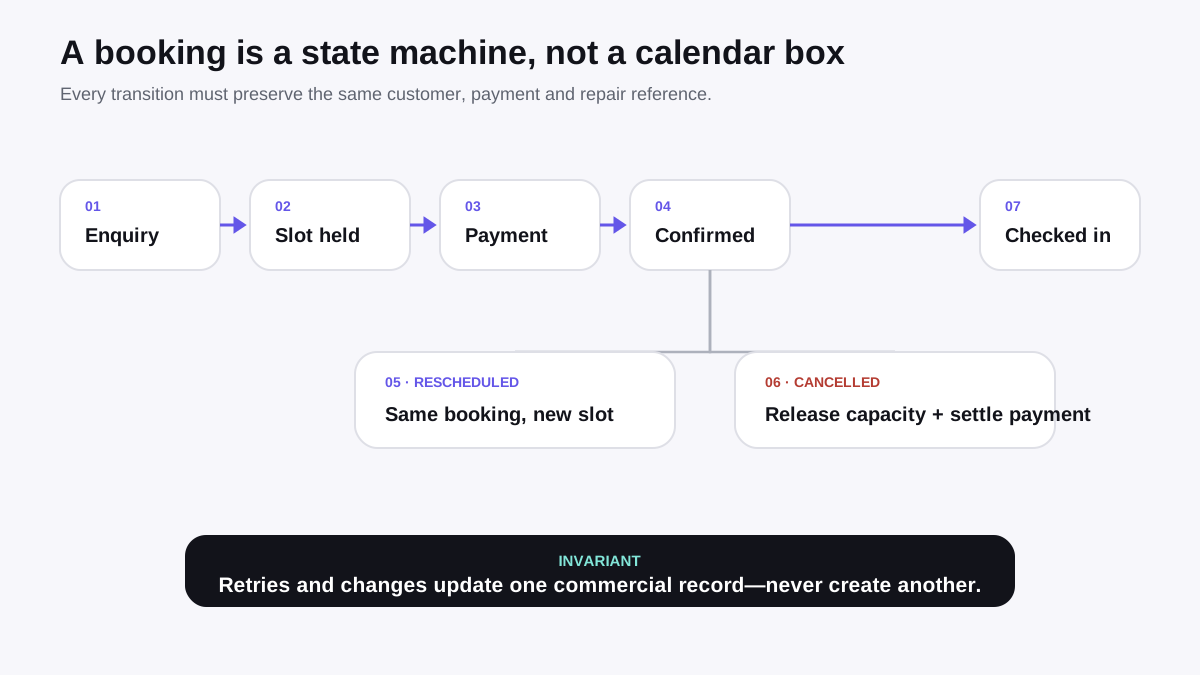
That's the whole flow. Device → repair → price → slot → confirmation. No phone call. No "contact us for a quote." No manual intervention from you.
I built cellbot because after 25 years in this industry I knew exactly what the bottlenecks were: quoting, intake, and follow-up. The widget addresses all three. You can read more about the AI quoting side of this in our detailed breakdown of AI quoting and device identification for repair shops.
Verdict: The right tool for any repair shop that takes bookings seriously.
How to Set Up a Generic Booking App on Shopify (Step by Step)
If you're starting out and want to test the water with a free or low-cost option before committing to a dedicated repair platform, here's how to set up Easy Appointment Booking on Shopify:
Step 1: Install the app. Search "Easy Appointment Booking" in the Shopify App Store. The free plan allows up to 10 bookings per month — enough for testing.
Step 2: Create a service. In the app dashboard, create a service called something like "Repair Drop-Off" or "Device Intake Appointment." Set a duration (I'd suggest 15–20 minutes for a standard drop-off).
Step 3: Configure availability. Set your working hours, block out lunch, and add any buffer time between appointments if you need it.
Step 4: Attach to a Shopify product. Create a Shopify product called "Book a Repair" (or attach to an existing product page). The app creates a calendar widget that appears on that product page.
Step 5: Add intake questions. Use the app's custom questions feature to add fields for device model, fault description, and contact number. Most booking apps support this. It's not as structured as a proper intake form, but it captures the basics.
Step 6: Test the flow. Book an appointment yourself from an incognito browser. Check that the confirmation email arrives, that the calendar blocks out the slot, and that the intake responses come through to your dashboard.
The limitations I mentioned earlier will become apparent quickly — no automatic pricing, no device database, no IMEI field — but as a starting point it works.
How to Set Up cellbot on Shopify (Step by Step)
Step 1: Install the app. Find cellbot in the Shopify App Store and install it. You'll be taken through an onboarding flow that connects your Shopify store to your cellbot account.
Step 2: Configure your pricebook. The cellbot pricebook comes pre-populated with 30,000+ repair prices across 1,400+ devices. On the free plan you get iPhone pricing. On paid plans you unlock Android, tablets, laptops, and more. You can customise prices for your market — if your iPhone 15 screen repair is £119 rather than the default, change it. The widget will always quote your prices, not generic ones.
Step 3: Set your availability. In the cellbot dashboard, configure your opening hours and set how many concurrent bookings you can take per slot. If you have one technician, you probably want one slot per 30-minute window. If you have three, you can open three.
Step 4: Configure the widget appearance. You can set the widget colour, greeting message, and position (bottom right is standard). The widget is responsive and works on mobile without any additional configuration.
Step 5: Enable the widget on your storefront. In the Shopify admin, go to Online Store → Themes → Customise. The cellbot app embed block will appear in your theme sections. Enable it. Save. The widget is now live.
Step 6: Test the full flow. Open your storefront in an incognito window. Click the widget. Select a device. Select a repair. Verify the price quote appears. Book a time slot. Check that the confirmation arrives to the customer-side email and that the ticket appears in your cellbot dashboard.
From installation to live widget is typically under 30 minutes if your pricebook is already configured.
For more on how cellbot integrates with Shopify beyond booking, see our guide on selling repair services through Shopify and the best Shopify apps for repair businesses in 2026.
What Should the Customer Experience Actually Look Like?
Here's the experience that converts customers and the experience that loses them.
The Flow That Converts
Customer lands on your Shopify storefront — maybe from Google, maybe from a social ad
They see your widget or a prominent "Book a Repair" button
They click it and are immediately asked: "What device do you have?"
They type "iPhone 15 Pro" — or select from a dropdown — and the device is confirmed
They're asked what's wrong: Screen broken? Battery issues? Not charging?
They select "Screen Repair" and immediately see a price: "iPhone 15 Pro screen repair — £139"
They're shown available time slots: today at 2pm, today at 4pm, tomorrow morning
They pick a slot, enter their name and phone number, confirm
They receive an SMS and email confirmation with the appointment details, your address, and what to bring
They turn up. You have the ticket already created. The device, fault, and agreed price are all pre-populated.
That flow takes under two minutes. The customer never had to wait for a quote. They never had to ring you. They committed to a price upfront, which means no awkward conversations when they arrive. And you — or your front-of-house staff — didn't have to do anything until that customer walked through the door.
The Flow That Loses Customers
Customer lands on your Shopify storefront
They see a "Repairs" page with a list of services and no prices
They scroll down to a "Contact us for a quote" section
They fill in a contact form and wait
You reply three hours later
They've already booked somewhere else
This is the default experience for a large proportion of repair shops in the UK right now. It's not a criticism of the shop owners — they built what Shopify gives them out of the box. But it's a conversion disaster. Every hour of delay costs you bookings.
The research on this is unambiguous. Response time is the single biggest variable in service booking conversion. A customer who gets an instant quote and can book immediately has almost nothing left to do except turn up. A customer who has to wait for a quote has already started looking at your competitors.
What Information Do You Need to Capture at Booking?
Let me break down why each field matters:
Device make and model: Not "iPhone" — "iPhone 15 Pro Max 256GB". The repair price, parts availability, and repair complexity all depend on this. A booking that just says "iPhone screen" gives your technician nothing useful to prepare with.
Fault description: "Screen cracked" is enough for an intake form. "Screen cracked, also not charging, and the volume button is loose" is better — it lets you quote for additional repairs upfront and plan the job properly.
IMEI number: This is the device's unique identifier. It lets you verify the device model, check activation lock status before you agree to take it in (you don't want to accept a stolen device), and log the serial number for warranty purposes. It's not always practical to require it before booking, but it should be captured at drop-off if not before.
Customer contact details: Name, phone number (for SMS updates), and email (for confirmation and invoicing). All three.
Preferred appointment time: Obvious, but the granularity matters. "Morning" is not a slot. "9:30am on Thursday 6th March" is a slot. Make sure your booking system captures actual times, not vague windows.
Device passcode or unlock status: You'll need to access the device to test the repair. Getting this at booking rather than at drop-off speeds up the check-in considerably.
Device condition notes: Any pre-existing damage the customer wants noted before you start work. This protects you as much as it protects them — if there was already a small crack on the back panel before the screen repair, you want that logged.
cellbot's intake form captures all of this structured correctly. If you're using a generic booking app, you'll need to add custom questions for most of these fields, and you won't get the structured device data that a dedicated repair database provides.
How Do You Handle Confirmation and Follow-Up Automatically?
The booking itself is just the beginning. What happens after is where most shops drop the ball — and where the best shops differentiate themselves.
Immediate confirmation: As soon as the booking is made, the customer should receive an SMS and email confirming the appointment, the repair type, the agreed price, your address, parking information, and what to bring. This should happen automatically, within seconds, without any staff action. A customer who has to wait for a confirmation email is already wondering if the booking worked.
24-hour reminder: A simple SMS the day before: "Your iPhone 15 Pro screen repair is booked with Shop Name] tomorrow at 2pm at Address]. Reply CONFIRM to confirm or call us to rearrange." This halves no-show rates in my experience. Simple to set up, significant impact on your diary.
Status updates during repair: When your technician starts work, when the repair is complete, when the device is ready for collection. Each of these can be automated trigger-based messages. The customer doesn't need to ring you to find out what's happening. That keeps your phone quieter and your customers happier.
Collection confirmation: When the device is collected and payment taken, a receipt by email and a thank-you message.
Review request: 24–48 hours after collection, a short message: "Hope your device] is working perfectly. If you have a moment, we'd love a Google review — it genuinely helps our small business." Automated, timed, and personalised.
cellbot handles all of these. You configure the messages once, and they fire automatically at each stage of the ticket lifecycle. You can see a full breakdown of how the ticket pipeline works in our Shopify POS for repair shops guide.
How Do Shopify Repair Bookings Compare to a Standalone Booking System?
This is a genuine question worth answering honestly, because not every repair shop needs to be on Shopify.
If you're primarily a repair shop — 80%+ of revenue from labour, minimal parts or accessories retail — then Shopify may be overkill as your primary storefront. Platforms designed specifically for service businesses, or even a simple WordPress site with a repair widget, might serve you better and cost less.
Where Shopify makes real sense for repair shops is when you have meaningful product sales alongside repairs: accessories, cases, screen protectors, refurbished handsets, cables. In that scenario, Shopify's inventory management, multi-location support, and retail POS are genuinely valuable — and adding cellbot on top of Shopify gives you the repair workflow without abandoning the retail infrastructure you're already using.
The Shopify + cellbot combination is designed specifically for shops in this position. Shopify handles what it was built for; cellbot handles what Shopify wasn't. The two don't overlap and they don't conflict.
For a deep comparison of Shopify versus WordPress for repair shops, see our Shopify vs WordPress guide for repair businesses — though that's a separate question from the booking system decision.
Frequently Asked Questions
Does Shopify have a native repair booking feature?
This is true of all Shopify plans, including Shopify Plus. The platform is architected around physical product sales, and while it's excellent at that, service scheduling is not part of its native feature set.
Can I use a Shopify product page to take repair bookings?
It's a common starting point and better than nothing. But any shop doing more than a handful of repairs per week will quickly find the lack of structure creates operational headaches at drop-off.
What information should a repair booking form collect?
The more structured information you capture at booking, the faster and smoother the actual drop-off will be — and the better protected you are if there are any disputes about pre-existing damage.
How does the cellbot widget handle device pricing on Shopify?
You can customise all prices in your cellbot dashboard to match your actual pricing. The widget always quotes your prices, not generic market rates. This is the key difference from generic booking apps, which have no pricing intelligence at all.
Is the cellbot widget mobile-friendly on Shopify?
The widget renders at an appropriate size for mobile screens, the touch targets are correctly sized, and the device selection flow is optimised for thumb navigation.
How long does it take to set up repair bookings on Shopify?
The bigger investment of time is in configuring your pricing accurately and testing the full customer flow. I'd recommend spending an hour on that before you go live.
What happens to bookings if a customer no-shows?
A £10–£20 deposit is a reasonable practice for high-demand slots or expensive repairs. It filters out low-commitment enquiries and significantly improves appointment attendance rates.
What's the Best Way to Get Started?
If you're on Shopify and you want to take repair bookings properly — not through a hacked-together workaround, but with real device selection, real pricing, and real automation — the path I'd recommend is this:
Install cellbot. Configure your pricebook (it takes less time than you think, because most of it is pre-built). Set your availability. Go live. Then spend a week watching what happens to your enquiry-to-booking conversion rate before and after.
In my experience, the single biggest lever on repair booking conversion is instant pricing. Customers who get a price immediately book immediately. Customers who get "contact us for a quote" leave. Everything else — the confirmation flow, the intake form, the reminders — matters too, but the pricing transparency is what unlocks the conversion.
If you want to explore the full platform before committing, see what cellbot includes and review the pricing. The free plan is available without a credit card and includes AI quoting for iPhone repairs, which is enough to see whether the approach works for your shop.
Repair shops have spent too long apologising for Shopify's booking gap. You don't have to any more.
cellbot's Shopify integration adds AI-powered booking to your store — real device selection, instant pricing from a database of over 30,000 repairs, and automated confirmation and follow-up. No workarounds, no hacked-together product listings pretending to be appointments. Just a proper repair booking experience that converts browsers into booked jobs. Get started free →
Sajad is the founder of cellbot and has spent 25 years in the tech repair industry. He founded CellTech in Birmingham and built cellbot to solve the operational problems he kept running into — quoting delays, intake chaos, and missed follow-ups. cellbot is currently in pre-launch and approaching retailers for trials.
More on Shopify for repair shops: How to Sell Repair Services on Shopify: The Complete Guide · Shopify POS for Repair Shops: Can It Replace Your Current System? · How to Display Repair Prices on Your Shopify Store · Best Shopify Apps for Repair Businesses in 2026