How to Sell Repair Services on Shopify: The Complete Guide for Repair Shop Owners
By Sajad, Co-founder at cellbot — 25 years in the tech repair industry Published: 15 December 2025
I've watched repair shop owners spend weeks setting up Shopify, list their services as "products," get frustrated when customers can't figure out how to book a repair through a standard checkout, and either abandon the whole thing or settle for a half-broken experience that confuses everyone. It's one of the most common mistakes I see.
Shopify is a brilliant platform. I'm not here to talk you out of it. But it was built for selling physical products, and repair services behave completely differently. A screen replacement isn't a t-shirt. It has a variable price depending on the device model. It requires a diagnosis. It involves customer consent, device intake, turnaround estimates, and pickup logistics. Shopify doesn't handle any of that natively — and the repair apps that currently exist on the Shopify App Store range from mediocre to essentially non-functional.
This guide is for repair shop owners who want to use Shopify properly: understand what it genuinely does well, what it can't do without the right tools, and how to build a setup that actually works for your business.
Key Takeaways - Shopify's ecommerce ecosystem makes it genuinely useful for repair shops selling parts, accessories, and refurbished devices — but service intake requires additional tooling - The current Shopify App Store has almost nothing built specifically for repair management: no AI quoting, no device catalogue, no repair-specific intake flow - The right approach is layered: Shopify handles your online presence and payments; a repair-specific app handles intake, quoting, and workflow management - RepairPlugin's 583 WordPress users validate real demand for a Shopify-native repair booking widget — that gap now has a solution - cellbot is pre-launch and entering a market where independent repair shops genuinely need better tools than what currently exists
Why Are Repair Shop Owners Choosing Shopify in the First Place?
This is a legitimate reason. Most standalone repair platforms like RepairDesk and Orderry are excellent at managing the repair workflow but limited when you want to sell accessories, parts, or refurbished devices alongside your services. They have basic ecommerce functions, but they're not ecommerce platforms. The product catalogues are limited, the checkout experiences are dated, and the marketing tools are minimal.
Shopify solves all of that. You get a professional storefront, built-in SEO tools, email marketing integrations, abandoned cart recovery, discount codes, a genuine mobile app, and payment processing that works. For a repair shop with a serious accessories business or a refurbished device operation, those are real advantages.
I've seen repair shops do very well on Shopify. Repair Outlet UK, for example, sells parts and accessories through a Shopify store and handles their actual repair workflow separately. That division makes sense: let Shopify do what Shopify does brilliantly, and handle the repair-specific complexity elsewhere.
The problem arises when repair shop owners try to force Shopify to handle the entire repair workflow — intake, diagnosis notes, repair pricing by device model, technician assignment, status updates, collection scheduling. Shopify isn't designed for any of that, and the available apps don't fill the gap well enough.
What Does the Shopify Repair App Landscape Actually Look Like?
I spent time going through what's actually available on the Shopify App Store for repair businesses. Here's what exists:
Unified Repairs Support — A basic ticket tracker with 5 reviews over three years. That review count tells you most of what you need to know. It handles the absolute fundamentals of tracking a repair from intake to completion, but nothing more. No AI, no automated quoting, no device catalogue.
RepairDesk POS for Shopify — This is a sync bridge, not a standalone solution. It connects your Shopify store to a separate RepairDesk subscription. So you're paying for both platforms, managing two systems, and hoping the sync doesn't break. RepairDesk is a solid platform in its own right (I reviewed it in the repair shop management software guide), but this Shopify integration has zero reviews and requires RepairDesk as a prerequisite.
Fixio — POS-only, zero reviews. Built primarily for point-of-sale in-store transactions rather than the online service intake that most Shopify owners are trying to achieve.
Hubtiger — Built for bike and outdoor equipment repair shops. Service management workflow that doesn't translate well to consumer electronics. Zero reviews on Shopify.
What's absent is telling. No app on the Shopify App Store currently offers:
AI-powered device identification from photo uploads
A repair pricing widget that shows customers instant quotes by device model
A device catalogue covering 1,400+ devices
Automated quote-to-booking conversion
A technician-facing workflow with proper ticket management
The gap is significant. The market exists — it just hasn't been served properly.
How Does Shopify Compare to Standalone Repair Platforms?
Let me be direct about this comparison, because most guides won't be.
Where Shopify Has a Clear Advantage
Ecommerce ecosystem: If you sell accessories, parts, or refurbished phones online, Shopify's product management, checkout, and marketing integrations are substantially better than anything built into repair-specific platforms. You get Shopify Payments, which is competitive on processing fees, plus integrations with Klarna, PayPal, Apple Pay, and others out of the box.
Theme quality: Shopify themes are genuinely good. A well-chosen theme with your branding looks professional immediately, without the dated UI that plagues many specialist repair platforms.
App marketplace: 8,000+ apps covering email marketing (Klaviyo), loyalty programmes (Smile.io), upselling, live chat, reviews, and more. Standalone platforms can't match this breadth.
Brand trust: Customers are familiar with Shopify checkout. It reduces friction at the payment stage.
Where Standalone Platforms Are Better
Repair workflow depth: RepairDesk, Orderry, and similar platforms are purpose-built for the repair journey. Intake forms capture the right information from the start. Technician assignment, parts ordering, status progression, and collection scheduling all work out of the box. You don't need to hack these together.
Pricing by device model: Standalone platforms have pricebook functionality built in. You can set different prices for iPhone 15 Pro screen replacement versus iPhone 14 screen replacement versus Samsung S24 Ultra screen replacement. Shopify's product system isn't designed for this kind of device-specific pricing.
Customer notifications tied to repair status: Automatic SMS and email updates when a repair moves from "In Repair" to "Ready for Collection" — this is built into specialist platforms and requires significant configuration work in Shopify.
The Best of Both Worlds
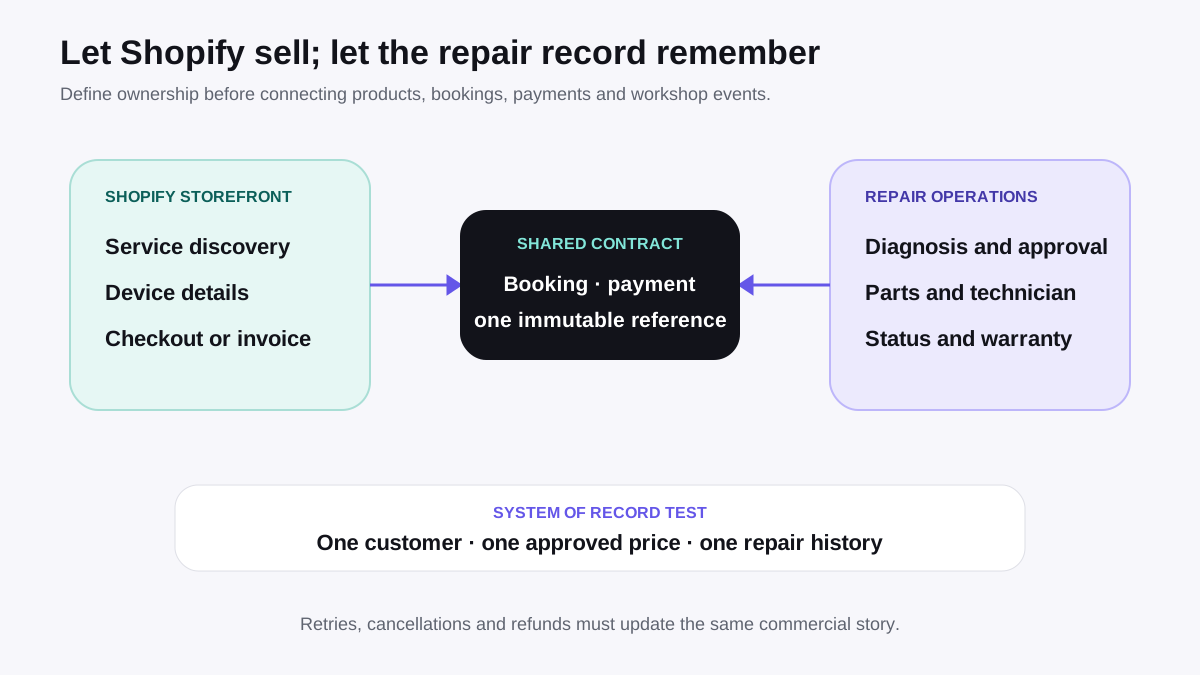
The most capable setup for a serious repair business in 2026 is Shopify for your customer-facing storefront and ecommerce, combined with a repair-specific tool that handles intake, quoting, and workflow. This is the approach that makes sense for shops doing both significant service volume and online product sales.
That combination is exactly what cellbot is built to provide: a Shopify-native app that brings AI-powered quoting, a repair widget, and proper intake management to your Shopify store — without requiring you to run a separate platform. We're pre-launch, and I'll be honest that we haven't yet earned the right to claim this is fully proven at scale. But the model is right.
Step 1: How Do You Set Up a Shopify Store for Repair Services?
Setting up Shopify for a repair business requires deliberate decisions at the store creation stage: choosing a service-appropriate theme, configuring your service catalogue correctly, and establishing the payment flow that works for repair deposits and variable pricing. The next decision is how to display repair prices on Shopify without turning services into confusing product pages.
Here's the practical setup sequence.
Choose a Theme Built for Services, Not Products
Most Shopify themes are optimised for physical products with photos, add-to-cart buttons, and quantity selectors. For a repair shop, you want a theme that puts your service list, contact information, and booking process front and centre. Look for:
Clean, professional layouts without heavy product-grid sections
Prominent call-to-action buttons (Book a Repair, Get a Quote)
Good mobile performance — most customers will find you on mobile
Fast page load times (Core Web Vitals matter for local SEO)
Themes like Symmetry, Prestige, or Dawn customised properly all work. Avoid themes built around fashion or lifestyle branding — the visual language doesn't fit a repair business.
Configure Your Store Location and Contact Details
Repair shops are local businesses. Make your physical address, phone number, and opening hours impossible to miss. This matters for local SEO (Google Maps rankings) and for converting customers who want to know you're genuinely nearby. Add your address to your Shopify footer, your Contact page, and ideally your header.
Step 2: How Do You List Repair Services as Products on Shopify?
Here's how most repair shops handle this, and where it falls apart.
The Standard Approach (and Its Limits)
Create a product called "Screen Replacement." Add variants: iPhone 15, iPhone 15 Pro, iPhone 15 Pro Max, Samsung Galaxy S24, and so on. Set individual prices per variant. This works acceptably for a limited service menu targeting popular devices only.
The problem is scale. iPhone alone has 40+ models that might reasonably come through your door. Samsung's current and recent lineup adds another 30+. Add Google Pixel, Sony Xperia, OnePlus, and Motorola, and you're maintaining hundreds of variants manually. Every time Apple releases a new model, you're updating Shopify. Every time your pricing changes, you're updating dozens of variants.
It's workable at the low end. It's unsustainable at scale.
The Better Approach: A Repair Widget That Does the Work
The smarter solution is a widget on your Shopify store that handles device-specific quoting dynamically. A customer visits your page, types in their device model or selects it from a catalogue, selects the repair type, and sees the instant price — all without you manually maintaining hundreds of product variants.
This is how RepairPlugin works for WordPress users. They have 583 active installs covering 2,900+ device models. Repair shop owners clearly want this functionality — the adoption proves it. The equivalent for Shopify simply hasn't existed until now. The cellbot widget brings this to Shopify: a customer-facing interface that pulls from a pricebook covering 1,400+ devices and 30,000+ repair prices, with AI-powered device identification from photo uploads.
You can read more about how the AI quoting side of this works in the AI quoting and device identification guide.
Step 3: How Do You Handle Repair Bookings Through Shopify?
This is where the gap between Shopify and specialist platforms is most obvious.
The Booking Problem
Shopify's native checkout is designed for buying products: add to cart, enter shipping address, pay. Repair bookings need something different: select service, specify device, choose appointment time, provide device condition details, confirm pricing, and optionally pay a deposit. None of that maps cleanly onto a standard product purchase.
Practical Solutions
Booking apps: Apps like Sesami or BookThatApp add appointment scheduling to Shopify. They're built for general service businesses (salons, consultants, fitness studios) and can be configured for repair shops. The limitation is that they don't understand repair-specific data — device model, condition, repair type. You'll need a custom intake form or a follow-up process to capture that information.
Contact form intake: The most common approach repair shops currently use — a detailed contact form (What device? What's the issue? Your best description of what happened?) that triggers an email or SMS follow-up to confirm pricing and book an appointment. Low-tech but functional. The failure point is response time: if you don't reply quickly, you lose the booking to a competitor who does. This is exactly the problem AI quoting solves — a customer who gets an instant quote via a widget is far more likely to book than one waiting for an email reply.
Repair widget with integrated booking: The ideal solution combines quoting and booking in one flow. Customer identifies their device, sees the price, and books an appointment — all within your Shopify storefront, without leaving the page. This is what cellbot's widget provides.
Step 4: How Do You Display Repair Prices on Your Shopify Store?
Static price lists are the most common approach and the worst. They're out of date within weeks, they can't accommodate the 40+ iPhone variants your customers might ask about, and they frustrate customers who have to scroll through a long table looking for their specific model.
Product pages with variants work better but require substantial manual maintenance as described above.
A dynamic widget is the right answer at any reasonable scale. Search by device model, select repair type, get instant price. From a conversion perspective, this also dramatically outperforms a price list: a customer who sees their exact price is ready to book. A customer who's told to "call us for a quote" is halfway out the door already.
One important business consideration: whatever pricing you display publicly needs to be accurate and consistent with what you charge in store. Customers who see one price online and get quoted something different in person don't come back. If your pricing varies by parts quality tier (OEM vs aftermarket), be explicit about that upfront.
Step 5: How Should You Manage Parts Inventory on Shopify?
For repair shops with a significant accessories and parts sales operation alongside their service business, this is actually one of Shopify's strongest features. Stock levels sync across your online store and point of sale, low-stock alerts work reliably, and supplier management through purchase orders is functional.
The complication is parts specifically used in repairs. A screen you have in stock might be earmarked for a customer's repair ticket. Shopify has no concept of a "committed" stock item tied to a specific repair order. If you sell that screen as an accessory through your online store the same morning your technician planned to use it for a repair, you have a conflict.
The clean solution is separation: maintain your repair parts inventory in your repair management system, and maintain your sellable accessories and products in Shopify. Keep them distinct. If you occasionally convert repair parts to customer sales (a customer asks to buy the screen themselves, for example), handle that as a manual adjustment.
Step 6: How Do You Handle Payments for Repairs Through Shopify?
Shopify Payments is competitive on fees (typically 1.5-2.2% for UK merchants on paid plans) and handles card payments, Apple Pay, Google Pay, and Klarna natively. For the payment collection side of running a repair shop, it works well.
The complexity is that repair pricing is often variable. A screen replacement might be £89 for an iPhone 14 but £149 for an iPhone 15 Pro Max. If a customer books online at one price and the diagnosis reveals additional issues, you need a process for communicating updated pricing and getting customer approval before proceeding.
The standard approach for professional repair shops:
Customer pays a small diagnostic deposit online (£10-20) to confirm the booking
Technician diagnoses, confirms repair scope and price
Customer approves (via SMS, email, or in person)
Final payment collected at collection, or via a Shopify payment link for remote settlement
Shopify's draft orders and payment link features support this flow reasonably well. You create a draft order for the full repair cost, send the customer a payment link, and they can pay before collecting the device.
For managing the consent and approval stage between diagnosis and payment, you need a CRM or communication tool. This is core to what repair shop management software handles — the structured workflow between intake and payment that keeps customers informed and protects you legally.
Step 7: How Do You Automate Customer Communication for Repairs on Shopify?
Shopify sends automatic notifications for order confirmation, payment receipt, and fulfilment. For physical products, that's sufficient. For repairs, the customer lifecycle has many more stages: booking confirmed → device received → diagnosis complete → repair started → parts ordered (if needed) → repair complete → ready for collection.
Each of those stage transitions is an opportunity to proactively update the customer rather than waiting for them to call. Proactive updates reduce inbound calls by 40-60% in practice. That's a meaningful reduction in staff time.
The options for building this into a Shopify-based repair operation:
Shopify Email + manual triggers: Use Shopify's email marketing tools to send update templates manually at each stage. Time-consuming and error-prone, but free.
Klaviyo or similar email platforms: Set up triggered email flows based on order status or tags. Works for email automation but doesn't natively handle SMS.
SMS apps (Postscript, SMSBump): Add SMS capability to your Shopify store for appointment reminders and status updates. Requires configuration to map repair stages to message triggers.
Repair management app with built-in communications: The cleanest solution — a tool that understands repair stages natively and sends the right message at the right time without manual intervention. This is built into cellbot: automated SMS and email updates at each pipeline stage, configurable per shop.
If you want to understand what good repair-specific customer communication looks like and how it affects retention, the customer communications guide covers this in detail.
What Do Repair Shops Actually Use Shopify For Today?
This is worth being honest about. The repair shops doing well on Shopify today are generally the ones that embraced the division: Shopify for products, a separate system for repairs. That division works, but it creates operational friction — separate customer records, separate invoicing, separate inventory, manual reconciliation.
Repair Outlet UK is a good example of the parts and accessories model: a professional Shopify store selling iPhone screens, batteries, charging cables, and tools to DIY repairers and other repair shops. The ecommerce capability is the point, not service management.
The fully integrated model — one platform that handles your ecommerce storefront, your repair widget, your service intake, your ticket workflow, and your customer communication — is what's missing from the Shopify ecosystem. That's the gap cellbot is designed to fill. We're building toward it, we're pre-launch, and I'm not going to oversell what we can do before we've proven it with real shops. But the direction is right.
Is Shopify Right for Your Repair Shop?
This is the honest answer. Don't adopt Shopify because it's a big name or because a guide told you it's the future. Adopt it because it solves a real problem in your specific business.
If your repair shop is primarily a service business — walk-in customers, local marketing, no online product sales — RepairDesk, Orderry, or similar platforms are purpose-built for your workflow and will be faster to get running. You can read the full comparison of repair shop software options to evaluate what fits your situation.
If you sell accessories online, have multiple locations, run a refurbished device business, or want to build a brand with serious online presence, Shopify's infrastructure makes it the right foundation — with the right tools alongside it to handle the repair-specific complexity.
The wrong move is doing what most repair shops do: setting up Shopify half-heartedly, struggling with service listings and the booking process, and abandoning it after a few months without ever reaching its potential.
Ready to supercharge your Shopify repair shop? Try cellbot free for 5 days — it integrates directly with Shopify to handle bookings, quotes, and customer communication automatically.
Frequently Asked Questions
Can I run a repair shop entirely on Shopify without a separate repair management platform?
You can, but with significant limitations. You'll need to manually maintain product variants for every device model, build a custom intake process, and handle technician workflow and customer communications through Shopify's general tools rather than repair-specific functionality. It's workable for very small operations, but it doesn't scale well. Most repair shops either use Shopify purely for product sales with a separate repair platform for service management, or they use a Shopify-native repair app that brings workflow management into the platform.
What's the best way to take repair bookings through a Shopify store?
The most effective setup combines a repair pricing widget (so customers can get an instant quote specific to their device) with an integrated booking flow that captures the device details and schedules the appointment in one sequence. Contact forms followed by manual email follow-up work but lose bookings to competitors who respond faster. Booking apps like Sesami can add scheduling, but they don't understand repair-specific intake requirements natively and need customisation.
How do I handle variable repair pricing on Shopify — different prices for different phone models?
The standard Shopify approach is product variants: one product per repair type, variants per device model, individual prices set per variant. This works for a limited menu but becomes difficult to maintain across hundreds of device models. A repair pricing widget handles this dynamically — a customer selects or searches for their device model, and the current price is returned from your pricebook without you maintaining individual product variants.
Are there any good repair shop apps on the Shopify App Store?
The current landscape is thin. Unified Repairs Support has minimal reviews and basic functionality. RepairDesk POS for Shopify requires a separate RepairDesk subscription. Fixio and Hubtiger are limited or misaligned for consumer electronics repair shops. There is no app currently on the Shopify App Store with AI-powered device identification, a comprehensive device catalogue, or a full repair workflow management system built natively for Shopify. That gap is what cellbot is entering the market to fill.
How should I handle repair payments on Shopify — deposit upfront or full payment at collection?
The professional standard for repair shops is a diagnostic deposit at booking (£10-20 is typical in the UK) to confirm the appointment, with the balance collected at collection once the repair is complete and approved. Shopify's payment links and draft order features support this flow. Collecting full payment upfront is common for straightforward repairs with fixed pricing (like battery replacements) but creates complications if the diagnosis reveals additional issues that change the quote.
Does Shopify work for a repair shop with multiple locations?
Shopify's multi-location inventory management is one of its genuine strengths. Stock levels, product listings, and fulfilment can be configured per location. For the service management side — routing repair bookings to the correct location, managing technicians across locations, location-specific pricing — you need a repair management tool that understands multi-location workflows. Shopify handles the product and payment layer well; the repair-specific layer needs dedicated tooling.
Sajad is the founder of cellbot, an AI-powered repair management platform for independent repair shops. He has 25 years of experience in the UK tech repair industry and ran CellTech, a multi-location repair business in Birmingham. cellbot integrates directly with Shopify and is currently in pre-launch. Explore the full feature set or view pricing.
More on Shopify for repair shops: Shopify POS for Repair Shops: Can It Replace Your Current System? · How to Display Repair Prices on Your Shopify Store · Best Shopify Apps for Repair Businesses in 2026 · How to Accept Repair Bookings Through Shopify