
By Hassan, Technical Lead at Cellbot
Published: 2 October 2025 · Fully reviewed: 29 August 2026
The best Shopify app stack for a repair shop is the smallest set that gives every customer device one controlled job record, keeps retail and repair stock reconciled and provides reliable booking, messages and customer access. Start with the repair-job owner. Add a general app only when a measured gap remains.
Current app listings change too quickly for a permanent winner. The shortlist below was checked on 26 August 2026 and is a candidate set, not an endorsement or claim that Cellbot installed and tested every product.
Recommendation: select one repair-system owner, then use Shopify-made or narrowly scoped apps for genuine gaps. Two apps writing the same customer, stock, status or message event create more risk than breadth.
The minimum-stack map
| Need | First option to test | Add an app only when | Evidence before install |
| Repair job | One repair app or connected repair system | Shopify order fields cannot hold the required custody and work evidence | Full job lifecycle and export test |
| Retail POS and products | Shopify core/POS | A specific retail gap remains | Current plan and location scope |
| Customer chat | Existing repair route or Shopify Inbox | It reduces a measured hand-off without creating a second conversation record | Identity, handoff and retention test |
| Forms | Existing intake or Shopify Forms | The form is lead capture, not a substitute for device intake | Field, consent and failure map |
| Workflow | Native event/rule or Shopify Flow | Trigger, eligibility and rollback are clear | Duplicate, retry and outage cases |
| Store search | Shopify Search & Discovery | Customers sell or browse enough products for the gap to matter | Search-result and merchandising test |
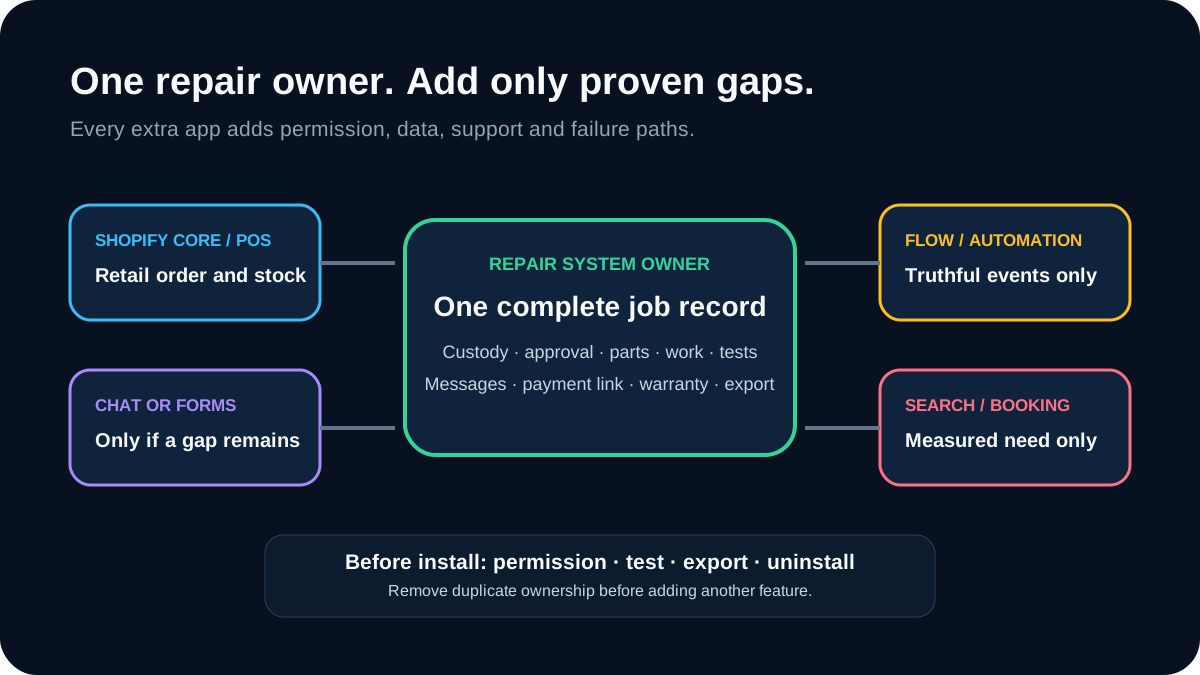
Download the Shopify repair-app evaluation register. It records purpose, permissions, personal data, system ownership, test cases, total cost, export, uninstall and decision evidence.
Shortlist the repair-system owner first
The 26 August 2026 Shopify App Store and UK search results surfaced these repair-oriented candidates:
| Candidate | Current listing position | Seller-described scope to verify | Main evaluation question |
| Fixio Services & repairs | Shopify App Store | POS/admin tickets, service status, payments and customer updates | Does its job record cover electronics intake, authority, parts, tests and warranty? |
| Repair & Service Ops | Shopify App Store | Repair jobs, service tickets, deposits and updates | Can records, permissions and exceptions be exported and reconciled? |
| Unified Repairs Support | Shopify App Store | E-commerce repair requests and management | Is it suited to in-store device custody and technician work? |
| RepairDesk Point of Sale | Shopify App Store integration | Inventory synchronisation between RepairDesk and Shopify | Which system owns customer, product, part, order and repair state? |
Descriptions, ratings, prices, limits and support can change. A listing's category or star rating is not proof of fit. Reviews can be useful signals, but small samples and old versions should not decide a critical workflow.
Test every repair candidate with:
- exact device identity and intake condition;
- original and revised quote approval;
- custody and technician ownership;
- reserved, fitted, removed and defective parts;
- final tests including explicit failures;
- customer updates and failed delivery;
- payment, refund and deposit reconciliation;
- warranty and dispute linkage;
- multiple locations and role boundaries; and
- data export, deletion and uninstall with open jobs.
The Shopify POS repair-fit guide owns the full retail-versus-repair boundary.
Evaluate Shopify-made supporting apps
Shopify Inbox
Shopify Inbox is a Shopify-made customer-chat option. Test it for public product questions, contact consent, staff handoff, transcript ownership and links into the actual repair enquiry. Do not let a separate chat history become the only source of a promised price or appointment.
The repair-shop chatbot guide provides adversarial, ambiguity, privacy and handoff cases. If the repair system already owns chat, another widget may add no value.
Shopify Forms
Shopify Forms can collect lead information. A lead form is not a device-intake record. Avoid collecting passcodes, unnecessary identifiers, intimate fault details or photographs unless the defined next step requires them and the processing route has been reviewed.
The repair-shop GDPR guide owns purpose, lawful basis, minimisation, retention and processor controls.
Shopify Flow
Shopify Flow can automate workflows using Shopify events and actions. Use it only where the event truth exists in Shopify or arrives through a tested integration.
For each workflow, record:
- trigger and source;
- eligibility rule;
- action and permission;
- evidence of success;
- duplicate and retry behaviour;
- visible exception owner; and
- stop and rollback route.
The repair automation guide owns that control loop. A Flow recipe cannot compensate for a missing repair status or owner.
Shopify Search & Discovery
Shopify Search & Discovery is relevant to product-led shops with enough accessories or refurbished inventory for search and filtering to affect customer decisions. It does not organise a repair pricebook or diagnose a device.
Measure no-result searches, search-to-product views and completed product orders. Do not infer repair enquiry value from retail search activity.
Add booking only after defining the appointment
Many booking apps are designed for classes, consultations or fixed-duration services. A repair booking can mean:
- device drop-off;
- while-you-wait standard repair;
- courier collection;
- remote consultation;
- diagnostic appointment; or
- collection after completion.
Define duration, location, capacity, technician skill, part dependency, deposit, cancellation, lateness and diagnostic uncertainty before evaluating a booking app. The system should not promise a repair-completion time merely because a calendar slot exists.
Preserve the booking's source, chosen service, terms and confirmation in the repair enquiry. Test daylight-saving changes, location mismatch, double booking, unavailable parts, failed payment and provider outage.
Review permissions and personal data
Shopify's current app-management guidance shows how merchants can review third-party app access, edit permissions, recent activity and privacy details. Perform that review before installation and periodically afterwards.
Create a permission table:
| Data or action | Read needed? | Write needed? | Why? | Retention | Revoke test |
| Products | Only if the app uses the catalogue | Only for a defined sync owner | Named feature | Contracted period | Remove and verify behaviour |
| Customers | Minimum fields only | Only if it owns the update | Named purpose and lawful basis | Defined period | Export/delete sample |
| Orders | Only for payment or fulfilment link | Avoid if reference is enough | Reconciliation | Financial/contract policy | Read-only fallback |
| Inventory | One master record | One controlled writer | Stock movement | Audit period | Duplicate/retry test |
| Discounts/refunds | Rarely | Confirmation and staff authority | Customer remedy | Audit period | Unauthorised-action test |
Do not grant broad access merely because it is the app's default request. If the supplier cannot explain a permission, stop.
Test uninstall and supplier failure
Before installing, ask what happens when:
- the app is unavailable;
- Shopify changes an API or permission;
- a sync event arrives twice or out of order;
- the vendor changes limits or stops the product;
- the shop downgrades a plan;
- billing fails;
- the app is uninstalled; or
- the shop needs every open and historic record elsewhere.
Export a sample and inspect it. Confirm that identifiers, timestamps, approvals, statuses, parts and attachments remain understandable outside the interface. A PDF report may be useful, but it is not always a migration-ready record.
Calculate app-stack cost honestly
Use each current listing and contract at the decision date. Include:
- base and usage charges;
- Shopify and POS plan dependencies;
- payment and messaging charges;
- onboarding, migration and configuration;
- custom workflow or integration work;
- staff training and review;
- reconciliation and incident time;
- export, exit and replacement; and
- duplicate functionality already paid for elsewhere.
Evaluate the full stack, not each app in isolation. Three inexpensive apps can cost more to operate than one well-fitted system when staff must reconcile their records.
Recommended selection sequence
- Map the repair job from enquiry through warranty.
- Choose the repair-system owner.
- Keep Shopify core for product, order and POS functions it already performs.
- List genuine gaps after the first pilot.
- Test one supporting app at a time with synthetic and controlled live cases.
- Review permissions, data, accessibility, support and exit.
- Remove apps whose measured benefit does not exceed their full cost and risk.
The software buyer test provides the wider evaluation structure; the Shopify versus WordPress guide owns the platform decision.
Where Cellbot stands today
Cellbot sells repair software and publishes this shortlist, but it is not yet listed in the Shopify App Store. It is therefore absent from the current-listed candidate table above. Shopify shops can assess Cellbot's supported storefront embed and discuss the separately scoped draft-order connection described in its public FAQ, but should not treat either route as an App Store installation.
Cellbot's official WordPress plugin is already public. That demonstrates a live WordPress distribution route; it is not evidence of Shopify approval. Current repair capabilities are on the features page, and plan scope is on the pricing page. Apply the same permission, lifecycle, failure, export and cost test to Cellbot as to every listed app.
This article does not claim Cellbot is the only repair app, the most reviewed option or the automatic winner. The fresh result set disproves the old “empty ecosystem” framing.
Shopify apps for repair shops FAQs
What is the best Shopify app for a phone repair shop?
There is no evidence for one universal winner. Shortlist current repair candidates and test the complete intake-to-warranty lifecycle, permissions, export, failure route and cost against your actual shop.
How many Shopify apps should a repair shop install?
As few as satisfy the defined workflow. Start with one repair-system owner and Shopify core. Add one app only when a measured gap remains.
Can booking apps replace repair software?
Usually not by themselves. A calendar slot does not preserve device custody, diagnosis, approval changes, parts, technician evidence, final tests or warranty history.
Is Shopify Flow useful for repairs?
Yes, when a truthful Shopify or integrated repair event exists and the action, duplicate handling, exception owner and rollback are defined. It should not infer repair status from an unrelated retail order state.
Should an app have access to all customer and order data?
Only if each permission is necessary for a documented purpose. Review read and write scope, recent activity, privacy details, retention and the result of revoking access.
What happens to repair tickets if an app is removed?
That depends on the supplier. Test export and uninstall before adoption, and keep a continuity route for open jobs. Do not assume Shopify retains an app's specialist records in usable form.
Sources, search evidence and update note
This article was reviewed again on 29 August 2026. Cellbot remains outside the listed-app table until its Shopify App Store listing is public; its live WordPress plugin is identified separately to avoid implying Shopify approval.
The 29 August US DataForSEO result for “Shopify repair app” was led by Shopify App Store pages. Unified Repairs Support ranked second, Fixio third and Repair & Service Ops ninth; Cellbot was absent from the sampled top ten. That makes an accurate public listing—not another generic app roundup—the essential distribution asset once Shopify approves the app. Exa supported current listing discovery, not rank evidence.
Current references:
- Shopify Help: managing apps, checked 26 August 2026
- Fixio Services & repairs, checked 26 August 2026
- Repair & Service Ops, checked 26 August 2026
- Unified Repairs Support, checked 26 August 2026
- RepairDesk Point of Sale, checked 26 August 2026
- Shopify Inbox, checked 26 August 2026
- Shopify Forms, checked 26 August 2026
- Shopify Flow, checked 26 August 2026
- Shopify Search & Discovery, checked 26 August 2026
- Cellbot Widget on WordPress.org, checked 29 August 2026
DataForSEO references: US keyword overview 08292241-1339-0607-0000-9b7bd089fc67; UK keyword overview 08292241-1339-0607-0000-0254e26e48d5; Shopify repair app SERP 08292241-1339-0139-0000-ba254c89b920.
Continue with the Shopify POS repair-fit guide, Shopify versus WordPress decision or repair software buyer test.


